Don't miss your chance to take the Fabric Data Engineer (DP-700) exam on us!
Learn moreNext up in the FabCon + SQLCon recap series: The roadmap for Microsoft SQL and Maximizing Developer experiences in Fabric. All sessions are available on-demand after the live show. Register now
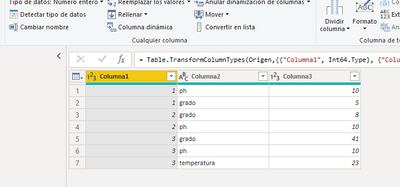
Is it possible to transpose the table in this way?
I have tried with Transpose and undo dynamization of powerbi columns but I have not been able to do it.
the result should look like this
| columna1 | ph | grado | temperatura |
| 1 | 10 | 5 | |
| 2 | 10 | 8 | |
| 3 | 10 | 41 | 23 |
here is the pbix
https://www.dropbox.com/s/mzqzwokd0mvxiuw/transpose.pbix?dl=0
thank you in advance for your help
Solved! Go to Solution.
You can Pivot (from the Transform menu in Power Query) Column2 using Column3 in Values.
With the data provided - 'Don't Aggregate' should work (from the Advanced options)
You can Pivot (from the Transform menu in Power Query) Column2 using Column3 in Values.
With the data provided - 'Don't Aggregate' should work (from the Advanced options)
¡¡thank you very much HotChilli!!
If you have recently started exploring Fabric, we'd love to hear how it's going. Your feedback can help with product improvements.
A new Power BI DataViz World Championship is coming this June! Don't miss out on submitting your entry.
Share feedback directly with Fabric product managers, participate in targeted research studies and influence the Fabric roadmap.
| User | Count |
|---|---|
| 48 | |
| 44 | |
| 40 | |
| 18 | |
| 18 |
| User | Count |
|---|---|
| 69 | |
| 69 | |
| 32 | |
| 32 | |
| 32 |