This is best Fabric, Power BI, SQL and AI community event. How do we know? The last event sold out! Save €200 with code FABCMTY200.
Register nowA new Data Days event is coming soon! This time we’re going bigger than ever. Fabric, Power BI, SQL, AI and more. Don't miss out.
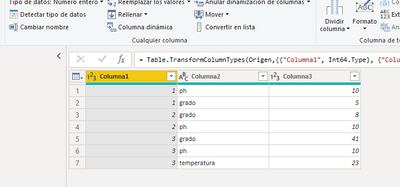
Is it possible to transpose the table in this way?
I have tried with Transpose and undo dynamization of powerbi columns but I have not been able to do it.
the result should look like this
| columna1 | ph | grado | temperatura |
| 1 | 10 | 5 | |
| 2 | 10 | 8 | |
| 3 | 10 | 41 | 23 |
here is the pbix
https://www.dropbox.com/s/mzqzwokd0mvxiuw/transpose.pbix?dl=0
thank you in advance for your help
Solved! Go to Solution.
You can Pivot (from the Transform menu in Power Query) Column2 using Column3 in Values.
With the data provided - 'Don't Aggregate' should work (from the Advanced options)
You can Pivot (from the Transform menu in Power Query) Column2 using Column3 in Values.
With the data provided - 'Don't Aggregate' should work (from the Advanced options)
¡¡thank you very much HotChilli!!
Check out the May 2026 Power BI update to learn about new features.
Sign up to receive a private message when registration opens and key events begin.
If you have recently started exploring Fabric, we'd love to hear how it's going. Your feedback can help with product improvements.
| User | Count |
|---|---|
| 31 | |
| 26 | |
| 23 | |
| 22 | |
| 13 |
| User | Count |
|---|---|
| 61 | |
| 47 | |
| 27 | |
| 23 | |
| 18 |