Get certified for free when you join Fabric Data Days 2026 and dive into Fabric, Power BI, SQL, AI, and other essential data skills.
Join nowData Days is here! Join us now for 60+ days of learning, challenges, and connection. Learn more
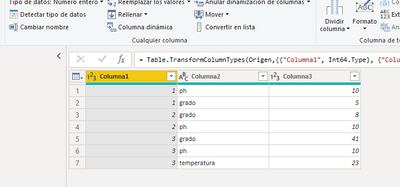
Is it possible to transpose the table in this way?
I have tried with Transpose and undo dynamization of powerbi columns but I have not been able to do it.
the result should look like this
| columna1 | ph | grado | temperatura |
| 1 | 10 | 5 | |
| 2 | 10 | 8 | |
| 3 | 10 | 41 | 23 |
here is the pbix
https://www.dropbox.com/s/mzqzwokd0mvxiuw/transpose.pbix?dl=0
thank you in advance for your help
Solved! Go to Solution.
You can Pivot (from the Transform menu in Power Query) Column2 using Column3 in Values.
With the data provided - 'Don't Aggregate' should work (from the Advanced options)
You can Pivot (from the Transform menu in Power Query) Column2 using Column3 in Values.
With the data provided - 'Don't Aggregate' should work (from the Advanced options)
¡¡thank you very much HotChilli!!
Don't miss out on Data Days, June 15 through August 7. Learn Fabric, Power BI, SQL, AI and more.
Check out the May 2026 Power BI update to learn about new features.
| User | Count |
|---|---|
| 23 | |
| 23 | |
| 21 | |
| 17 | |
| 13 |
| User | Count |
|---|---|
| 58 | |
| 51 | |
| 39 | |
| 29 | |
| 24 |