Join us at FabCon Atlanta from March 16 - 20, 2026, for the ultimate Fabric, Power BI, AI and SQL community-led event. Save $200 with code FABCOMM.
Register now!The Power BI Data Visualization World Championships is back! Get ahead of the game and start preparing now! Learn more
I am working with a set of demographic data and my data source is on SQL Server. To properly analyze and visualize it in Power BI, I need to transpose some columns into rows, preferably in a new table. I appreciate any recommendations to do that either in Power BI or in SQL server.
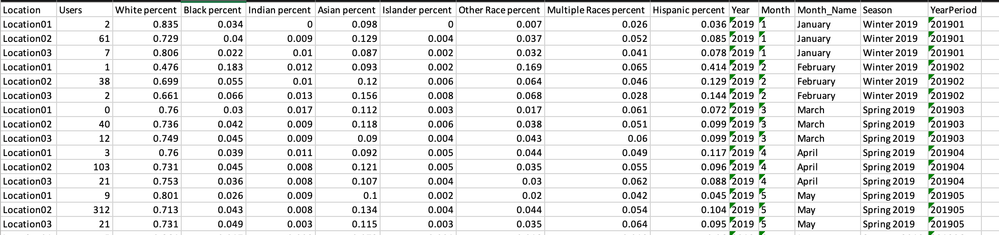
Here is how my data currently looks like:
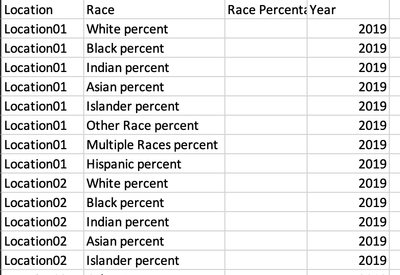
This is how I would like it to look like:
I have imported a portion of the data into Excel to provide the above screenshots.
Solved! Go to Solution.
@monibuw , Use unpivot in power quey
https://radacad.com/pivot-and-unpivot-with-power-bi
My Video
https://www.youtube.com/watch?v=2HjkBtxSM0g
@monibuw , Use unpivot in power quey
The Power BI Data Visualization World Championships is back! Get ahead of the game and start preparing now!
| User | Count |
|---|---|
| 40 | |
| 35 | |
| 34 | |
| 31 | |
| 27 |
| User | Count |
|---|---|
| 135 | |
| 102 | |
| 67 | |
| 65 | |
| 56 |