Join us in Barcelona for FabCon and SQLCon, September 28 - October 1, 2026.
This is best Fabric, Power BI, SQL and AI community event. How do we know? The last event sold out! Save €200 with code FABCMTY200.
Register now- Power BI forums
- Get Help with Power BI
- Desktop
- Service
- Report Server
- Power Query
- Mobile Apps
- Developer
- DAX Commands and Tips
- Custom Visuals Development Discussion
- Health and Life Sciences
- Power BI Spanish forums
- Translated Spanish Desktop
- Training and Consulting
- Instructor Led Training
- Dashboard in a Day for Women, by Women
- Galleries
- Data Stories Gallery
- Themes Gallery
- Contests Gallery
- QuickViz Gallery
- Quick Measures Gallery
- Visual Calculations Gallery
- Fabric Apps Gallery
- Notebook Gallery
- Translytical Task Flow Gallery
- TMDL Gallery
- R Script Showcase
- Webinars and Video Gallery
- Ideas
- Custom Visuals Ideas (read-only)
- Issues
- Issues
- Events
- Upcoming Events
The Fabric community is upgrading! Read all of the details including the timeline and what you can expect. Learn more
- Power BI forums
- Forums
- Get Help with Power BI
- Desktop
- Transform table structure
- Subscribe to RSS Feed
- Mark Topic as New
- Mark Topic as Read
- Float this Topic for Current User
- Bookmark
- Subscribe
- Printer Friendly Page


- Mark as New
- Bookmark
- Subscribe
- Mute
- Subscribe to RSS Feed
- Permalink
- Report Inappropriate Content
Transform table structure
Hi,
I have this Table 1 structure and I need to convert it to the Table 2 structure, mainly the values for the same ID to appear on a single row, separated by ;. Do you know how this can be achieved in Power Query?
Many thanks in advance for your support!
Table 1
| ID | Value |
| 1 | a |
| 1 | b |
| 1 | c |
| 2 | x |
| 2 | y |
| 2 | z |
Table 2
| ID | Value |
| 1 | a;b;c |
| 2 | x;y;z |
Solved! Go to Solution.


- Mark as New
- Bookmark
- Subscribe
- Mute
- Subscribe to RSS Feed
- Permalink
- Report Inappropriate Content
let
    Source = Web.BrowserContents("https://community.powerbi.com/t5/Desktop/Transform-table-structure/m-p/2250024#M818814"),
    #"Extracted Table From Html" = Html.Table(Source, {{"Column1", "TABLE:nth-child(6) > * > TR > :nth-child(1)"}, {"Column2", "TABLE:nth-child(6) > * > TR > :nth-child(2)"}}, [RowSelector="TABLE:nth-child(6) > * > TR"]),
    #"Promoted Headers" = Table.PromoteHeaders(#"Extracted Table From Html", [PromoteAllScalars=true]),
    #"Changed Type" = Table.TransformColumnTypes(#"Promoted Headers",{{"ID", Int64.Type}, {"Value", type text}}),
    #"Grouped Rows" = Table.Group(#"Changed Type", {"ID"}, {{"ad", each _, type table [ID=nullable number, Value=nullable text]}}),
    #"Added Custom" = Table.AddColumn(#"Grouped Rows", "Custom", each let x=[ad],
    y=x[Value]
    in Text.Combine(y,":")),
    #"Removed Columns" = Table.RemoveColumns(#"Added Custom",{"ad"})
in
    #"Removed Columns"
========================
Did I answer your question? Mark my post as a solution!
Proud to be a Super User
My Custom Visualization Projects
• Plotting Live Sound: Live Sound
• Beautiful News: Women in Parliament, Energy Mix, Shrinking Armies
• Visual Capitalist: Working Hrs
• Others: Easing Graph, Animated Calendar
MayViz Submissions
• Week 1: View
• Week 2: View
• Week 3: View
• Week 4: View
========================

- Mark as New
- Bookmark
- Subscribe
- Mute
- Subscribe to RSS Feed
- Permalink
- Report Inappropriate Content
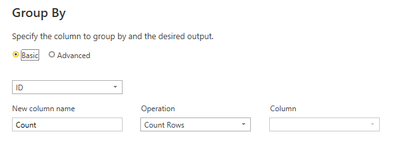
1) Group by ID (leave it on count as we will change later)
Results in:
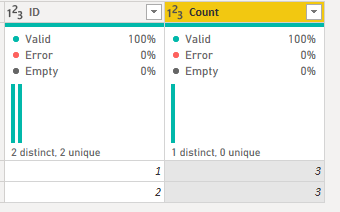
2) Go into the advanced editor and change the line:
#"Grouped Rows" = Table.Group(#"Changed Type", {"ID"}, {{"Count", each Table.RowCount(_), Int64.Type}})
to
#"Grouped Rows" = Table.Group(#"Changed Type", {"ID"}, {{"Combined", each Text.Combine([Value], "; "), type text}})- Mark as New
- Bookmark
- Subscribe
- Mute
- Subscribe to RSS Feed
- Permalink
- Report Inappropriate Content
1) Group by ID (leave it on count as we will change later)
Results in:
2) Go into the advanced editor and change the line:
#"Grouped Rows" = Table.Group(#"Changed Type", {"ID"}, {{"Count", each Table.RowCount(_), Int64.Type}})
to
#"Grouped Rows" = Table.Group(#"Changed Type", {"ID"}, {{"Combined", each Text.Combine([Value], "; "), type text}})

- Mark as New
- Bookmark
- Subscribe
- Mute
- Subscribe to RSS Feed
- Permalink
- Report Inappropriate Content
HI @andra2 ,
You can create a calculated column as follows:
Column =
CONCATENATEX (
    FILTER (
        SUMMARIZE ( Table2, Table2[ID], Table2[Value] ),
        Table2[ID] = EARLIER ( Table2[ID] )
    ),
    Table2[Value],
    ";"
)
This gives you required result:
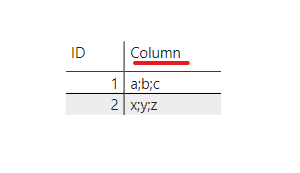
Thanks,
Pragati
- Mark as New
- Bookmark
- Subscribe
- Mute
- Subscribe to RSS Feed
- Permalink
- Report Inappropriate Content
Hi @smpa01 ,
Curious to know if my solution is not right.
Just want to understand what stopped you from accepting it as a solution? 🙂
Thanks,
Pragati
- Mark as New
- Bookmark
- Subscribe
- Mute
- Subscribe to RSS Feed
- Permalink
- Report Inappropriate Content
let
    Source = Web.BrowserContents("https://community.powerbi.com/t5/Desktop/Transform-table-structure/m-p/2250024#M818814"),
    #"Extracted Table From Html" = Html.Table(Source, {{"Column1", "TABLE:nth-child(6) > * > TR > :nth-child(1)"}, {"Column2", "TABLE:nth-child(6) > * > TR > :nth-child(2)"}}, [RowSelector="TABLE:nth-child(6) > * > TR"]),
    #"Promoted Headers" = Table.PromoteHeaders(#"Extracted Table From Html", [PromoteAllScalars=true]),
    #"Changed Type" = Table.TransformColumnTypes(#"Promoted Headers",{{"ID", Int64.Type}, {"Value", type text}}),
    #"Grouped Rows" = Table.Group(#"Changed Type", {"ID"}, {{"ad", each _, type table [ID=nullable number, Value=nullable text]}}),
    #"Added Custom" = Table.AddColumn(#"Grouped Rows", "Custom", each let x=[ad],
    y=x[Value]
    in Text.Combine(y,":")),
    #"Removed Columns" = Table.RemoveColumns(#"Added Custom",{"ad"})
in
    #"Removed Columns"
========================
Did I answer your question? Mark my post as a solution!
Proud to be a Super User
My Custom Visualization Projects
• Plotting Live Sound: Live Sound
• Beautiful News: Women in Parliament, Energy Mix, Shrinking Armies
• Visual Capitalist: Working Hrs
• Others: Easing Graph, Animated Calendar
MayViz Submissions
• Week 1: View
• Week 2: View
• Week 3: View
• Week 4: View
========================

Helpful resources

FabCon & SQLCon – Barcelona 2026
Join us in Barcelona for FabCon and SQLCon, the Fabric, Power BI, SQL, and AI community event. Save €200 with code FABCMTY200.

Power BI DataViz World Championships - June 2026
A new Power BI DataViz World Championship is coming this June! Don't miss out on submitting your entry.

| User | Count |
|---|---|
| 24 | |
| 22 | |
| 20 | |
| 18 | |
| 14 |


| User | Count |
|---|---|
| 45 | |
| 38 | |
| 24 | |
| 21 | |
| 20 |


