This time we’re going bigger than ever. Fabric, Power BI, SQL, AI and more. We're covering it all. You won't want to miss it.
Learn moreDid you hear? There's a new SQL AI Developer certification (DP-800). Start preparing now and be one of the first to get certified. Register now
My graph used to forecast fine, but now, after updating the dataset, I have the following error: "to forecast, data cannot have empty values". I'm not sure how to approach this one. I would like to forecast up to 2026, but it seems I have an empty field (see image below). The Y axis is coming from a measure, the code is shown below. The X axis is a calendar that was generated from 2021 to 2026. Any help would be super appreciated! Thanks
Remaining Tokens02 =
VAR __StartingTokens = 375802
VAR __MaxDate = MAX('Date Table'[StartDate])
RETURN
__StartingTokens -
CALCULATE(
SUM(Token2021[Credits]),
'Date Table'[StartDate] <= __MaxDate,
ALL(Token2021[StartDate])
)
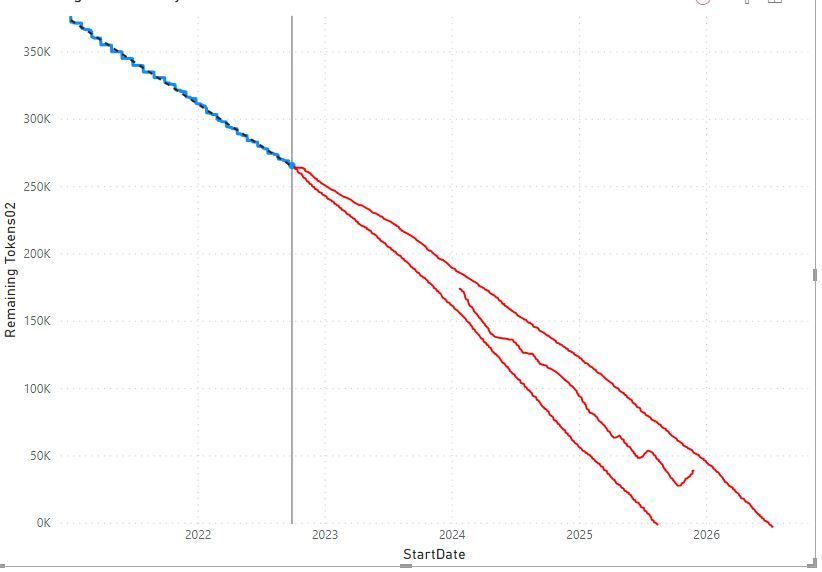
I want the forecast back (was very nice!)
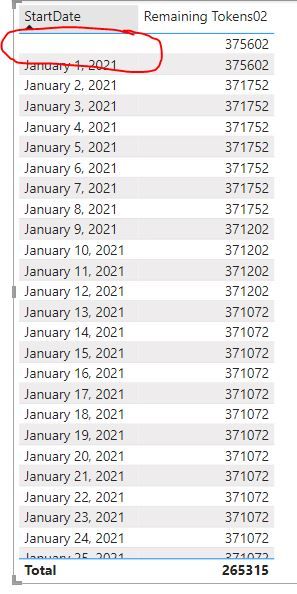
I this this empty field is the culprit
Hi @jfn ,
I think this may be caused by relationship between tables, try to modify the formula like this:
Remaining Tokens02 =
VAR __StartingTokens = 375802
VAR __MaxDate =
MAX ( 'Date Table'[StartDate] )
RETURN
IF (
MAX ( [StartDate] ) <> BLANK (),
__StartingTokens
- CALCULATE (
SUM ( Token2021[Credits] ),
'Date Table'[StartDate] <= __MaxDate,
ALL ( Token2021[StartDate] )
)
)
Best Regards,
Community Support Team _ kalyj
If this post helps, then please consider Accept it as the solution to help the other members find it more quickly.
With this formulae, I still have an empty row (pic below)... Not sure if this is related, but here's how I generated the dates (for reference).
Date Table = CALENDAR(DATE(2021,01,01),TODAY())
Check out the April 2026 Power BI update to learn about new features.
Sign up to receive a private message when registration opens and key events begin.
If you have recently started exploring Fabric, we'd love to hear how it's going. Your feedback can help with product improvements.
| User | Count |
|---|---|
| 34 | |
| 31 | |
| 25 | |
| 20 | |
| 16 |
| User | Count |
|---|---|
| 61 | |
| 49 | |
| 28 | |
| 23 | |
| 23 |