cancel
Showing results for 
Search instead for 
Did you mean: 

Data Days is here! Join us now for 60+ days of learning, challenges, and connection. Learn more

Reply
Anonymous
Not applicable

Time difference between adjacent rows

OK - so I'm trying to do something with a table in PowerBI that I hope will be easier than trying in Excel!


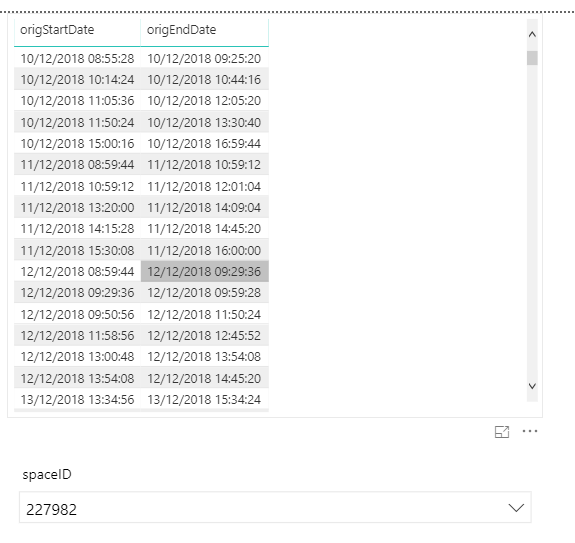
I have a table which contains meeting start and end datetimes for a number of rooms.


What I need to determine is the time difference between the end of one meeting and the start of the next one in the SAME room on the SAME day


I have loaded the tables and am using a slicer to filter based on the room ID so I can see all data relating to a specific room but I'm not sure how to write the DAX to calculate the different that I want.


Can someone advise please if this is possible and if so how?


-Dave

powerbi1.png

1 ACCEPTED SOLUTION

Try with "," per ";"


They are calculated columns and try with this code better:


Dif = 
var DStart=DIFDates[origStartDate]
var DEnd=DIFDates[origEndDate]
var Room=DIFDates[ROOM]
var DBefore=CALCULATE(MAX(DIFDates[origEndDate]);FILTER(DIFDates;DIFDates[ROOM]=Room && DIFDates[origEndDate]<=DStart && DIFDates[origStartDate].[Day]=DIFDates[origEndDate].[Day] && DIFDates[origStartDate].[Month]=DIFDates[origEndDate].[Month] && DIFDates[origStartDate].[Year]=DIFDates[origEndDate].[Year]))
return
DATEDIFF(DBefore;DIFDates[origStartDate];MINUTE)/60

Best Regards,
Miguel

If this post helps, then please consider Accept it as the solution to help the other members find it more quickly.


View solution in original post

4 REPLIES 4
ZunzunUOC
Resolver III
Resolver III

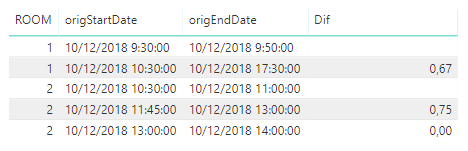
Hi @Anonymous , maybe it helps you:


Dif = 
var DStart=DIFDates[origStartDate]
var DEnd=DIFDates[origEndDate]
var Room=DIFDates[ROOM]
var DBefore=CALCULATE(MAX(DIFDates[origEndDate]);FILTER(DIFDates;DIFDates[ROOM]=Room && DIFDates[origEndDate]<=DStart))
return
IF((DATEDIFF(DBefore;DIFDates[origStartDate];MINUTE)/60)>=24;BLANK();(DATEDIFF(DBefore;DIFDates[origStartDate];MINUTE)/60))

reply008.png


Best Regards,
Miguel

If this post helps, then please consider Accept it as the solution to help the other members find it more quickly.

Anonymous
Not applicable

Thanks - would this be a column or a measure?

Anonymous
Not applicable

I get syntax errors: "The syntax for ';' is incorrect..."

Try with "," per ";"


They are calculated columns and try with this code better:


Dif = 
var DStart=DIFDates[origStartDate]
var DEnd=DIFDates[origEndDate]
var Room=DIFDates[ROOM]
var DBefore=CALCULATE(MAX(DIFDates[origEndDate]);FILTER(DIFDates;DIFDates[ROOM]=Room && DIFDates[origEndDate]<=DStart && DIFDates[origStartDate].[Day]=DIFDates[origEndDate].[Day] && DIFDates[origStartDate].[Month]=DIFDates[origEndDate].[Month] && DIFDates[origStartDate].[Year]=DIFDates[origEndDate].[Year]))
return
DATEDIFF(DBefore;DIFDates[origStartDate];MINUTE)/60

Best Regards,
Miguel

If this post helps, then please consider Accept it as the solution to help the other members find it more quickly.


Helpful resources

Announcements
Fabric Data Days is here Carousel

Fabric Data Days 2026

Don't miss out on Data Days, June 15 through August 7. Learn Fabric, Power BI, SQL, AI and more.

May Power BI Update Carousel

Power BI Monthly Update - May 2026

Check out the May 2026 Power BI update to learn about new features.

Power BI DataViz World Championships carousel

Power BI DataViz World Championships - June 2026

A new Power BI DataViz World Championship is coming this June! Don't miss out on submitting your entry.