Learn from the best! Meet the four finalists headed to the FINALS of the Power BI Dataviz World Championships! Register now
OK - so I'm trying to do something with a table in PowerBI that I hope will be easier than trying in Excel!
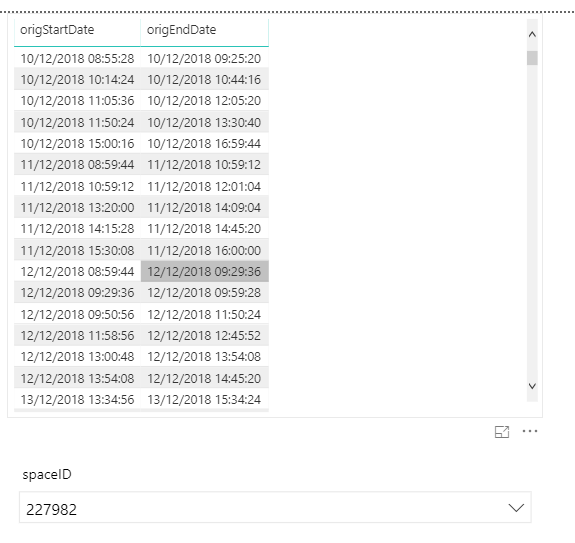
I have a table which contains meeting start and end datetimes for a number of rooms.
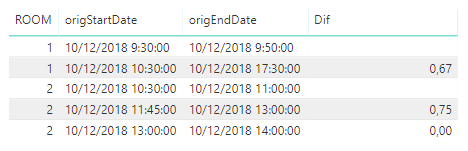
What I need to determine is the time difference between the end of one meeting and the start of the next one in the SAME room on the SAME day
I have loaded the tables and am using a slicer to filter based on the room ID so I can see all data relating to a specific room but I'm not sure how to write the DAX to calculate the different that I want.
Can someone advise please if this is possible and if so how?
-Dave
Solved! Go to Solution.
Try with "," per ";"
They are calculated columns and try with this code better:
Dif = var DStart=DIFDates[origStartDate] var DEnd=DIFDates[origEndDate] var Room=DIFDates[ROOM] var DBefore=CALCULATE(MAX(DIFDates[origEndDate]);FILTER(DIFDates;DIFDates[ROOM]=Room && DIFDates[origEndDate]<=DStart && DIFDates[origStartDate].[Day]=DIFDates[origEndDate].[Day] && DIFDates[origStartDate].[Month]=DIFDates[origEndDate].[Month] && DIFDates[origStartDate].[Year]=DIFDates[origEndDate].[Year])) return DATEDIFF(DBefore;DIFDates[origStartDate];MINUTE)/60
Best Regards,
Miguel
If this post helps, then please consider Accept it as the solution to help the other members find it more quickly.
Hi @Anonymous , maybe it helps you:
Dif = var DStart=DIFDates[origStartDate] var DEnd=DIFDates[origEndDate] var Room=DIFDates[ROOM] var DBefore=CALCULATE(MAX(DIFDates[origEndDate]);FILTER(DIFDates;DIFDates[ROOM]=Room && DIFDates[origEndDate]<=DStart)) return IF((DATEDIFF(DBefore;DIFDates[origStartDate];MINUTE)/60)>=24;BLANK();(DATEDIFF(DBefore;DIFDates[origStartDate];MINUTE)/60))
Best Regards,
Miguel
If this post helps, then please consider Accept it as the solution to help the other members find it more quickly.
Thanks - would this be a column or a measure?
I get syntax errors: "The syntax for ';' is incorrect..."
Try with "," per ";"
They are calculated columns and try with this code better:
Dif = var DStart=DIFDates[origStartDate] var DEnd=DIFDates[origEndDate] var Room=DIFDates[ROOM] var DBefore=CALCULATE(MAX(DIFDates[origEndDate]);FILTER(DIFDates;DIFDates[ROOM]=Room && DIFDates[origEndDate]<=DStart && DIFDates[origStartDate].[Day]=DIFDates[origEndDate].[Day] && DIFDates[origStartDate].[Month]=DIFDates[origEndDate].[Month] && DIFDates[origStartDate].[Year]=DIFDates[origEndDate].[Year])) return DATEDIFF(DBefore;DIFDates[origStartDate];MINUTE)/60
Best Regards,
Miguel
If this post helps, then please consider Accept it as the solution to help the other members find it more quickly.
| User | Count |
|---|---|
| 57 | |
| 43 | |
| 32 | |
| 16 | |
| 13 |
| User | Count |
|---|---|
| 84 | |
| 70 | |
| 37 | |
| 27 | |
| 24 |