Don't miss your chance to take the Fabric Data Engineer (DP-700) exam on us!
Learn moreWe've captured the moments from FabCon & SQLCon that everyone is talking about, and we are bringing them to the community, live and on-demand. Starts on April 14th. Register now
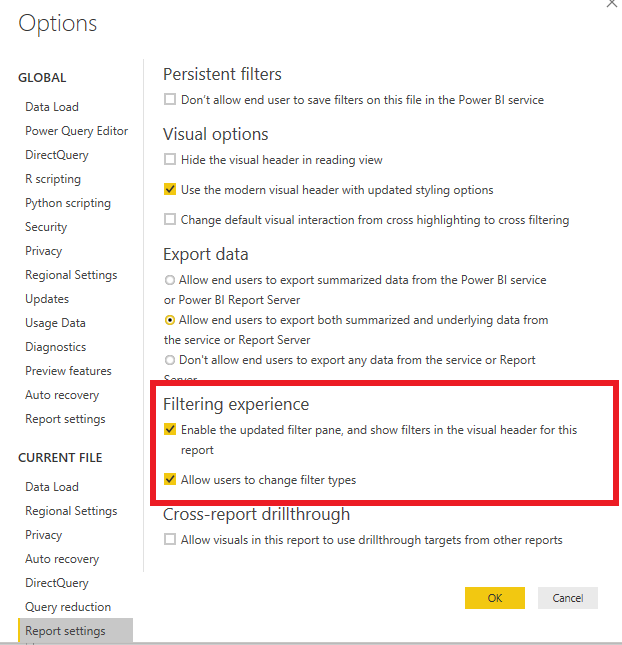
I have enabled the option in the report settings where users can change the filter types.
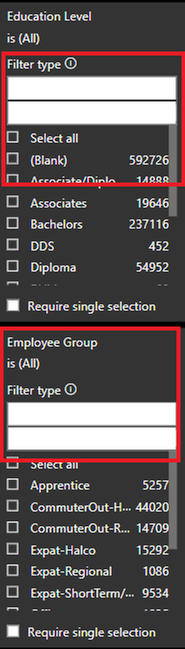
However, in the front end I still see only the one as follows:
Any idea where I am going wrong?
Thank you!
Solved! Go to Solution.
@v-juanli-msft Not sure what the glitch was. I restarted my computer and it was good to go!
Thanks,
Akshaya
Hi @Anonymous
Which version of Power BI Desktop and Service do you use?
I use Version: 2.70.5494.661 64-bit (June 2019) for Power BI Desktop,
Version13.0.9880.163 for Power BI Service,
It works on my side.
After enabling "Allow users to change filter types", users can change filter type on Power BI Service.
Please check the version and update to the lastest one.
Here is an similar issue which occured in previous version along with workarounds.
Best Regards
Maggie
Community Support Team _ Maggie Li
If this post helps, then please consider Accept it as the solution to help the other members find it more quickly.
@v-juanli-msft Not sure what the glitch was. I restarted my computer and it was good to go!
Thanks,
Akshaya
If you have recently started exploring Fabric, we'd love to hear how it's going. Your feedback can help with product improvements.
A new Power BI DataViz World Championship is coming this June! Don't miss out on submitting your entry.
Share feedback directly with Fabric product managers, participate in targeted research studies and influence the Fabric roadmap.
| User | Count |
|---|---|
| 55 | |
| 40 | |
| 35 | |
| 19 | |
| 18 |
| User | Count |
|---|---|
| 73 | |
| 72 | |
| 38 | |
| 35 | |
| 26 |