
cancel
Showing results for 
Search instead for 
Did you mean: 

Join the FabCon + SQLCon recap series. Up next: Power BI, Real-Time Intelligence, IQ and AI, and Data Factory take center stage. All sessions are available on-demand after the live show. Register now

Reply
Anonymous
Not applicable

Text Extract - M Query

Hi frds,

I have query for Edit Query mode, need result DAX/M Quey. 


I need Colour type from Description column, maybe it will add new colour also in future.


screen.PNG


Thanks,

KV

1 ACCEPTED SOLUTION

Hi @Anonymous ,


You can use Transform --> Extract --> Extract between delimiters in Edit query on your Description column.

Try this option with differet delimiters whichever works for you.


If this helps and resolves the issue, appreciate a Kudos and mark it as a Solution! 🙂


Thanks,

Pragati

Best Regards,

Pragati Jain


MVP logo


LinkedIn | Twitter | Blog YouTube 

Did I answer your question? Mark my post as a solution! This will help others on the forum!

Appreciate your Kudos!!

Proud to be a Super User!!

View solution in original post

5 REPLIES 5
Ashish_Mathur
Super User
Super User

Hi,

If you can share a master list of all possible colours which can be found in the Description column, then i can solve this problem with a DAX formula.


Regards,
Ashish Mathur
http://www.ashishmathur.com
https://www.linkedin.com/in/excelenthusiasts/
amitchandak
Super User
Super User

@Anonymous , using switch true or if create a color measure like thsi


Color Date = if(FIRSTNONBLANK('Date'[Date],TODAY()) <today(),"lightgreen","red")

or

color =
switch ( true(),
FIRSTNONBLANK(Table[commodity],"NA") ="commodity1" && sum(Table[Value]) >500,"lightgreen",
FIRSTNONBLANK(Table[commodity],"NA") ="commodity2" && sum(Table[Value]) >1000,"lightgreen",
/// Add more conditions
"red"
)


In conditional formatting use "field" and the color measure

https://radacad.com/dax-and-conditional-formatting-better-together-find-the-biggest-and-smallest-numbers-in-the-column


Please Watch/Like/Share My webinar on Time Intelligence: https://community.powerbi.com/t5/Webinars-and-Video-Gallery/PowerBI-Time-Intelligence-Calendar-WTD-YTD-LYTD-Week-Over-Week/m-p/1051626#M184
My Youtube Tips at: https://www.youtube.com/playlist?list=PLPaNVDMhUXGYrm5rm6ME6rjzKGSvT9Jmy

Appreciate your Kudos.


Share with Power BI Enthusiasts: Full Power BI Video (20 Hours) YouTube
Microsoft Fabric Series 60+ Videos YouTube
Microsoft Fabric Hindi End to End YouTube
Anonymous
Not applicable

Hi @amitchandak ,


I need extract colour name in the description column.


Thanks,

KV

Hi @Anonymous ,


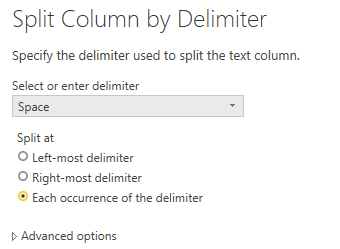
Or Transform -> Split Column.

aa1.PNGaa2.PNG


Best regards,
Lionel Chen

If this post helps, then please consider Accept it as the solution to help the other members find it more quickly.

Hi @Anonymous ,


You can use Transform --> Extract --> Extract between delimiters in Edit query on your Description column.

Try this option with differet delimiters whichever works for you.


If this helps and resolves the issue, appreciate a Kudos and mark it as a Solution! 🙂


Thanks,

Pragati

Best Regards,

Pragati Jain


MVP logo


LinkedIn | Twitter | Blog YouTube 

Did I answer your question? Mark my post as a solution! This will help others on the forum!

Appreciate your Kudos!!

Proud to be a Super User!!

Helpful resources

Announcements
April Power BI Update Carousel

Power BI Monthly Update - April 2026

Check out the April 2026 Power BI update to learn about new features.

New to Fabric survey Carousel

New to Fabric Survey

If you have recently started exploring Fabric, we'd love to hear how it's going. Your feedback can help with product improvements.

Power BI DataViz World Championships carousel

Power BI DataViz World Championships - June 2026

A new Power BI DataViz World Championship is coming this June! Don't miss out on submitting your entry.

FabCon and SQLCon Highlights Carousel

FabCon &SQLCon Highlights

Experience the highlights from FabCon & SQLCon, available live and on-demand starting April 14th.