
Join us at FabCon Atlanta from March 16 - 20, 2026, for the ultimate Fabric, Power BI, AI and SQL community-led event. Save $200 with code FABCOMM.
Register now!Vote for your favorite vizzies from the Power BI Dataviz World Championship submissions. Vote now!
Hi frds,
I have query for Edit Query mode, need result DAX/M Quey.
I need Colour type from Description column, maybe it will add new colour also in future.

Thanks,
KV
Solved! Go to Solution.
Hi @Anonymous ,
You can use Transform --> Extract --> Extract between delimiters in Edit query on your Description column.
Try this option with differet delimiters whichever works for you.
If this helps and resolves the issue, appreciate a Kudos and mark it as a Solution! 🙂
Thanks,
Pragati
Hi,
If you can share a master list of all possible colours which can be found in the Description column, then i can solve this problem with a DAX formula.
@Anonymous , using switch true or if create a color measure like thsi
Color Date = if(FIRSTNONBLANK('Date'[Date],TODAY()) <today(),"lightgreen","red")
or
color =
switch ( true(),
FIRSTNONBLANK(Table[commodity],"NA") ="commodity1" && sum(Table[Value]) >500,"lightgreen",
FIRSTNONBLANK(Table[commodity],"NA") ="commodity2" && sum(Table[Value]) >1000,"lightgreen",
/// Add more conditions
"red"
)
In conditional formatting use "field" and the color measure
Please Watch/Like/Share My webinar on Time Intelligence: https://community.powerbi.com/t5/Webinars-and-Video-Gallery/PowerBI-Time-Intelligence-Calendar-WTD-YTD-LYTD-Week-Over-Week/m-p/1051626#M184
My Youtube Tips at: https://www.youtube.com/playlist?list=PLPaNVDMhUXGYrm5rm6ME6rjzKGSvT9Jmy
Appreciate your Kudos.
Hi @Anonymous ,
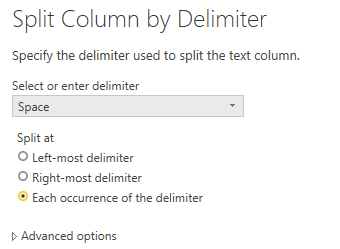
Or Transform -> Split Column.
Best regards,
Lionel Chen
If this post helps, then please consider Accept it as the solution to help the other members find it more quickly.
Hi @Anonymous ,
You can use Transform --> Extract --> Extract between delimiters in Edit query on your Description column.
Try this option with differet delimiters whichever works for you.
If this helps and resolves the issue, appreciate a Kudos and mark it as a Solution! 🙂
Thanks,
Pragati
Vote for your favorite vizzies from the Power BI World Championship submissions!
If you love stickers, then you will definitely want to check out our Community Sticker Challenge!
Check out the January 2026 Power BI update to learn about new features.
| User | Count |
|---|---|
| 64 | |
| 51 | |
| 46 | |
| 23 | |
| 19 |
| User | Count |
|---|---|
| 135 | |
| 110 | |
| 50 | |
| 31 | |
| 29 |