This time we’re going bigger than ever. Fabric, Power BI, SQL, AI and more. We're covering it all. You won't want to miss it.
Learn moreLevel up your Power BI skills this month - build one visual each week and tell better stories with data! Get started
Hi frds,
I have query for Edit Query mode, need result DAX/M Quey.
I need Colour type from Description column, maybe it will add new colour also in future.

Thanks,
KV
Solved! Go to Solution.
Hi @Anonymous ,
You can use Transform --> Extract --> Extract between delimiters in Edit query on your Description column.
Try this option with differet delimiters whichever works for you.
If this helps and resolves the issue, appreciate a Kudos and mark it as a Solution! 🙂
Thanks,
Pragati
Hi,
If you can share a master list of all possible colours which can be found in the Description column, then i can solve this problem with a DAX formula.
@Anonymous , using switch true or if create a color measure like thsi
Color Date = if(FIRSTNONBLANK('Date'[Date],TODAY()) <today(),"lightgreen","red")
or
color =
switch ( true(),
FIRSTNONBLANK(Table[commodity],"NA") ="commodity1" && sum(Table[Value]) >500,"lightgreen",
FIRSTNONBLANK(Table[commodity],"NA") ="commodity2" && sum(Table[Value]) >1000,"lightgreen",
/// Add more conditions
"red"
)
In conditional formatting use "field" and the color measure
Please Watch/Like/Share My webinar on Time Intelligence: https://community.powerbi.com/t5/Webinars-and-Video-Gallery/PowerBI-Time-Intelligence-Calendar-WTD-YTD-LYTD-Week-Over-Week/m-p/1051626#M184
My Youtube Tips at: https://www.youtube.com/playlist?list=PLPaNVDMhUXGYrm5rm6ME6rjzKGSvT9Jmy
Appreciate your Kudos.
Hi @Anonymous ,
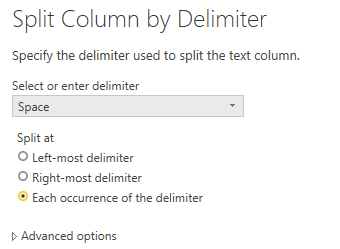
Or Transform -> Split Column.
Best regards,
Lionel Chen
If this post helps, then please consider Accept it as the solution to help the other members find it more quickly.
Hi @Anonymous ,
You can use Transform --> Extract --> Extract between delimiters in Edit query on your Description column.
Try this option with differet delimiters whichever works for you.
If this helps and resolves the issue, appreciate a Kudos and mark it as a Solution! 🙂
Thanks,
Pragati
Check out the April 2026 Power BI update to learn about new features.
Sign up to receive a private message when registration opens and key events begin.
If you have recently started exploring Fabric, we'd love to hear how it's going. Your feedback can help with product improvements.
| User | Count |
|---|---|
| 36 | |
| 33 | |
| 31 | |
| 24 | |
| 18 |
| User | Count |
|---|---|
| 70 | |
| 50 | |
| 33 | |
| 24 | |
| 24 |