Share feedback directly with Fabric product managers, participate in targeted research studies and influence the Fabric roadmap.
Sign up nowGet Fabric certified for FREE! Don't miss your chance! Learn more
Hi all,
I need some help with the conditional formatting:
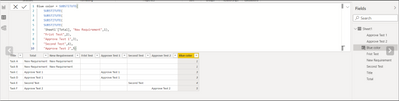
I have this Data set:
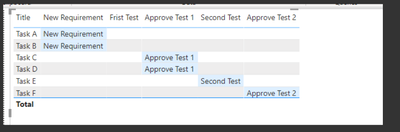
And I performed conditional formating when some integer from the Blue color col is appear and I got this table:
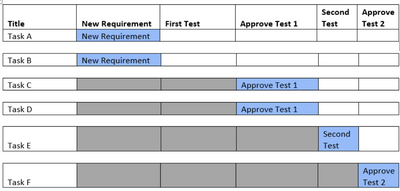
Now I would like to add additional conditional formatting that all what come before the blue color will be fill with grey color like in the picture below:
There is possible? if not there is another way beside conditional formatting to perform this?
Thanks a lot!
Solved! Go to Solution.
Hi @Anonymous
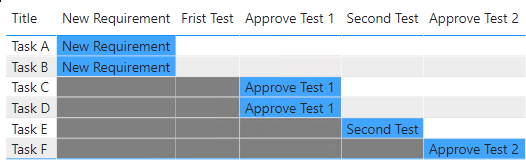
This is your expected output, right?
pbix is attached for your reference.
Hope this helps
Hi @Anonymous , can we have your sample dataset where we can copy the data to meet your requierement?
Thank you.
HI @mussaenda , unfortunately I can't share the PBI file (because I don't have permissions to do it).
However I can send the table and you can copy it into Excel file?
Please find the detailed table:
| Title | Total | New Requirement | Frist Test | Approve Test 1 | Second Test | Approve Test 2 | Blue Color |
| Task A | New Requirement | New Requirement | 1 | ||||
| Task B | New Requirement | New Requirement | 1 | ||||
| Task C | Approve Test 1 | Approve Test 1 | 3 | ||||
| Task D | Approve Test 1 | Approve Test 1 | 3 | ||||
| Task E | Second Test | Second Test | 4 | ||||
| Task F | Approve Test 2 | Approve Test 2 | 5 |
Thanks a lot!
Thanks!! It's works!
If you love stickers, then you will definitely want to check out our Community Sticker Challenge!
Check out the January 2026 Power BI update to learn about new features.
| User | Count |
|---|---|
| 62 | |
| 61 | |
| 42 | |
| 20 | |
| 18 |
| User | Count |
|---|---|
| 122 | |
| 116 | |
| 38 | |
| 32 | |
| 29 |