Join us at FabCon Atlanta from March 16 - 20, 2026, for the ultimate Fabric, Power BI, AI and SQL community-led event. Save $200 with code FABCOMM.
Register now!Get Fabric certified for FREE! Don't miss your chance! Learn more
Hi all,
I need some help with the conditional formatting:
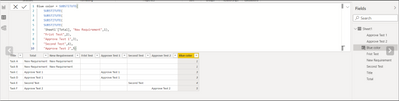
I have this Data set:
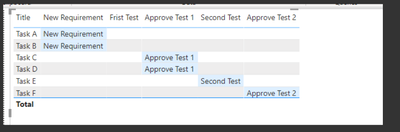
And I performed conditional formating when some integer from the Blue color col is appear and I got this table:
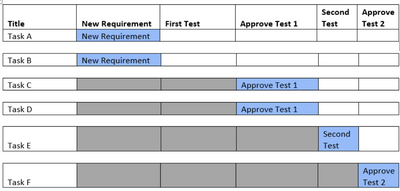
Now I would like to add additional conditional formatting that all what come before the blue color will be fill with grey color like in the picture below:
There is possible? if not there is another way beside conditional formatting to perform this?
Thanks a lot!
Solved! Go to Solution.
Hi @Anonymous
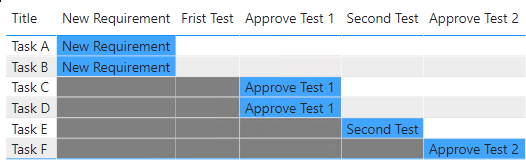
This is your expected output, right?
pbix is attached for your reference.
Hope this helps
Hi @Anonymous , can we have your sample dataset where we can copy the data to meet your requierement?
Thank you.
HI @mussaenda , unfortunately I can't share the PBI file (because I don't have permissions to do it).
However I can send the table and you can copy it into Excel file?
Please find the detailed table:
| Title | Total | New Requirement | Frist Test | Approve Test 1 | Second Test | Approve Test 2 | Blue Color |
| Task A | New Requirement | New Requirement | 1 | ||||
| Task B | New Requirement | New Requirement | 1 | ||||
| Task C | Approve Test 1 | Approve Test 1 | 3 | ||||
| Task D | Approve Test 1 | Approve Test 1 | 3 | ||||
| Task E | Second Test | Second Test | 4 | ||||
| Task F | Approve Test 2 | Approve Test 2 | 5 |
Thanks a lot!
Thanks!! It's works!
Share feedback directly with Fabric product managers, participate in targeted research studies and influence the Fabric roadmap.
Check out the February 2026 Power BI update to learn about new features.
| User | Count |
|---|---|
| 68 | |
| 59 | |
| 48 | |
| 20 | |
| 15 |
| User | Count |
|---|---|
| 107 | |
| 106 | |
| 39 | |
| 27 | |
| 27 |