cancel
Showing results for 
Search instead for 
Did you mean: 

The Power BI Data Visualization World Championships is back! Get ahead of the game and start preparing now! Learn more

Reply
Anonymous
Not applicable

TFS anonymous access

Hi,


I'm blocked and I need your help. I would like to do on PowerBI a POST API request on a TFS server which works fine on Postman but I always the same issue on PBI:

DataSource.Error: Web.Contents with the Content option is only supported when connecting anonymously.
Details:
DataSourceKind=Web
DataSourcePath=http://{instance}/DefaultCollection/{project}/_apis/wit/


The request is:


let
    url = "http://{instance}/DefaultCollection/{project}/_apis/wit/wiql?api-version=3.0",
    content = "
    {""query"": ""
        SELECT *
        FROM WorkItemLinks 
    	WHERE 
		    ([System.Links.LinkType] = 'System.LinkTypes.Dependency-Forward') 
		    AND Source.[System.WorkItemType] = 'Requirement' 
		    AND Source.[System.State] <> 'Closed'
			
		    AND ( Target.[System.WorkItemType] = 'Task' 
				OR Target.[System.WorkItemType] = 'Bug')
		    AND Target.[System.State] <> 'Closed'
	    ORDER BY [System.Id] 
	    ASOF '1/1/15'    
        mode(maycontain)""
    }",
    Source = Json.Document(Web.Contents(url,[Headers = [#"Content-Type"="application/json"], Content = Text.ToBinary(content) ] ))
in
    Source

As said below, on Postman, it works fine using NTLM Authentication method. So I do not known if the issue coming from the authentication method used on powerbi (basic GET API rest method works) or if the method is not correctly written ...


3 REPLIES 3
v-xuding-msft
Community Support
Community Support

Hi @Anonymous ,

 For the error message, I think you didn't choose Anonymous authentication for the web data source.


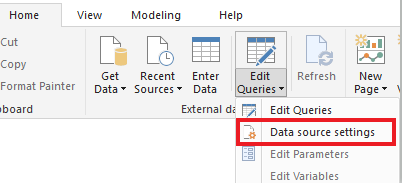
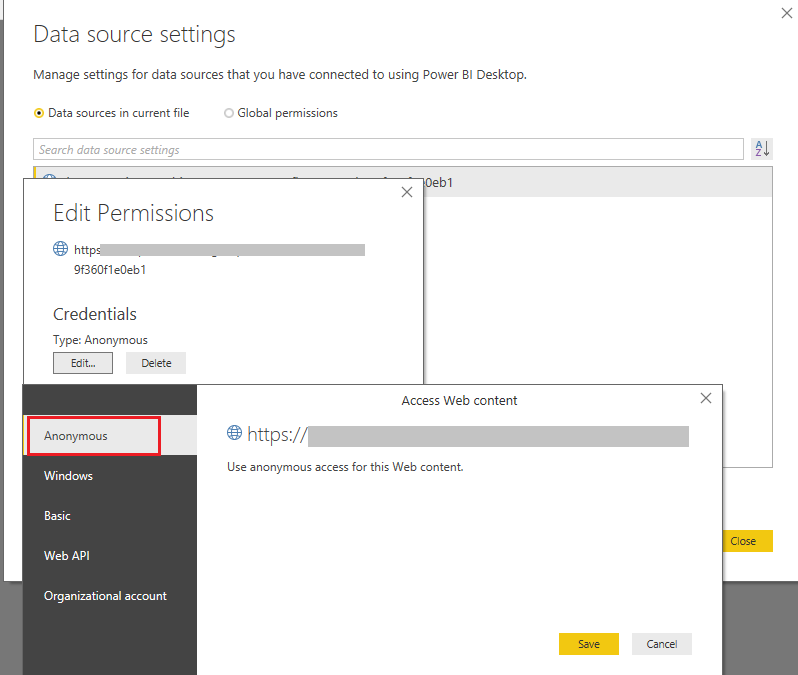
Please open Data Source Settings, then find the web data source, choose Anonymous like below: 

2.PNG


q2.PNG

Best Regards,

Xue Ding

If this post helps, then please consider Accept it as the solution to help the other members find it more quickly.

Best Regards,
Xue Ding
If this post helps, then please consider Accept it as the solution to help the other members find it more quickly.
Anonymous
Not applicable

Thank you @v-xuding-msft 

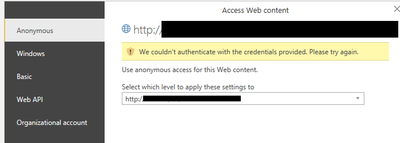
I already tried this solution, but it doesn't work:


Untitled.png


I also tried a POST request which doesn't need authentication, and every thing is ok, I suppose that I need to include authentication parameters into my request. 

Anonymous
Not applicable

After several investigations I found the issue but I didn't find the solution yet ...

Using basic authentication, when I run the query I have following issue :


"Expression.Error: The 'Authorization' header is only supported when connecting anonymously. These headers can be used with all authentication types: Accept, Accept-Charset, Accept-Encoding, Accept-Language, Cache-Control, Content-Type, If-Modified-Since, Prefer, Referer"


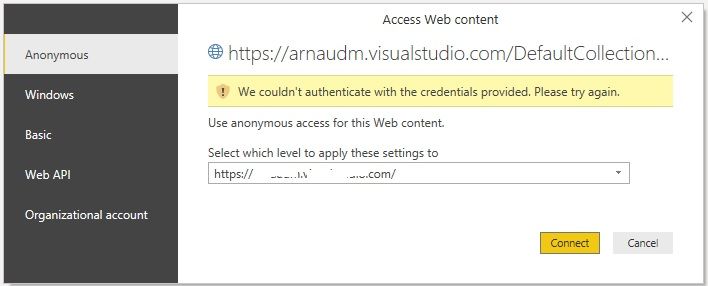
So, I changed the connection setting but, when I try to connect with Anonymous access to TFS I have following issue:Untitleds.jpg


I tried with the TFS2017 OnPrem version of my compagny, with my personal ADOS, still the same issue, I couldn't connect to TFS anonymously ...  Any idea ? 

Helpful resources

Announcements
Power BI DataViz World Championships

Power BI Dataviz World Championships

The Power BI Data Visualization World Championships is back! Get ahead of the game and start preparing now!

December 2025 Power BI Update Carousel

Power BI Monthly Update - December 2025

Check out the December 2025 Power BI Holiday Recap!

FabCon Atlanta 2026 carousel

FabCon Atlanta 2026

Join us at FabCon Atlanta, March 16-20, for the ultimate Fabric, Power BI, AI and SQL community-led event. Save $200 with code FABCOMM.