cancel
Showing results for 
Search instead for 
Did you mean: 

Vote for your favorite vizzies from the Power BI Dataviz World Championship submissions. Vote now!

Reply
Anonymous
Not applicable

Year Formatting not working in Current Selections Multi-row card

Hi,


I have a Year field YYYY which I have formatted as Data Type: Whole Number and Format: Whole Number.

I have also kept zero decimal places.


When I use this column in the table report, it correctly shows the Years as 1994, 1995 and so on till 2019.


However, I am also using this column as a report level filter and showing the current selections made using a measure as below - 

IF(ISFILTERED(Year), SELECTEDVALUE(Year, "Multiple Selections"), "No Selection").
In the current selections Multi-row card, the selected Year value appears with 2 decimal places i.e. 1994.00, 1995.00 and so on.
 
Please help to format it correctly in the Multi-row card.
 
Thanks,
Vishy


1 ACCEPTED SOLUTION
v-lid-msft
Community Support
Community Support

Hi @Anonymous ,


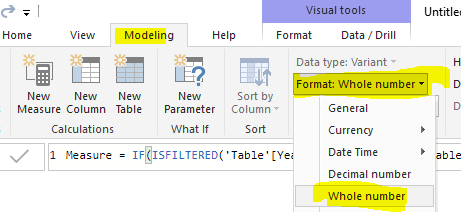
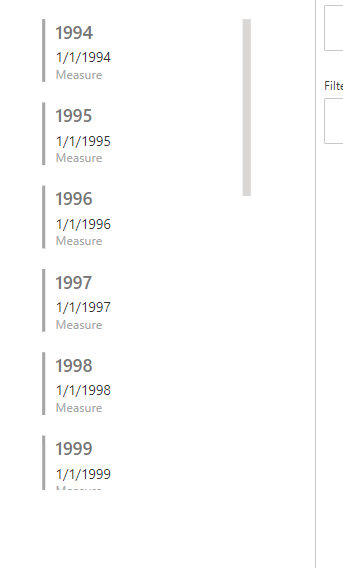
We can change the format of measure to whole number to fix this problem.


24.PNG26.PNG


BTW, pbix as attached.


Best regards,

Community Support Team _ Dong Li
If this post helps, then please consider Accept it as the solution to help the other members find it more quickly.

Community Support Team _ Dong Li
If this post helps, then please consider Accept it as the solution to help the other members find it more quickly.

View solution in original post

1 REPLY 1
v-lid-msft
Community Support
Community Support

Hi @Anonymous ,


We can change the format of measure to whole number to fix this problem.


24.PNG26.PNG


BTW, pbix as attached.


Best regards,

Community Support Team _ Dong Li
If this post helps, then please consider Accept it as the solution to help the other members find it more quickly.

Community Support Team _ Dong Li
If this post helps, then please consider Accept it as the solution to help the other members find it more quickly.

Helpful resources

Announcements
Power BI DataViz World Championships

Power BI Dataviz World Championships

Vote for your favorite vizzies from the Power BI World Championship submissions!

Sticker Challenge 2026 Carousel

Join our Community Sticker Challenge 2026

If you love stickers, then you will definitely want to check out our Community Sticker Challenge!

January Power BI Update Carousel

Power BI Monthly Update - January 2026

Check out the January 2026 Power BI update to learn about new features.

FabCon Atlanta 2026 carousel

FabCon Atlanta 2026

Join us at FabCon Atlanta, March 16-20, for the ultimate Fabric, Power BI, AI and SQL community-led event. Save $200 with code FABCOMM.