cancel
Showing results for 
Search instead for 
Did you mean: 

July 7 - July 17 | Round 2 of the Power BI Dataviz World Championships. Don't miss your chance! Learn more

Reply
Anonymous
Not applicable

Switch statement not working

Perc_display =
   SWITCH (
      TRUE (),
      '_1'[Value]= 0.0 , "0%",
      '_1'[Value]= 0.05, "5%",
      '_1'[Value]= 0.10, "10%",
      '_1'[Value]= 0.15, "15%",
      '_1'[Value]= 0.20, "20%",
      '_1'[Value]= 0.25, "25%",
      '_1'[Value]= 0.30, "30%",
      '_1'[Value]= 0.35, "35%",
      '_1'[Value]= 0.40, "40%",
      '_1'[Value]= 0.45,"45%",
      '_1'[Value]= 0.50,"50%",
      '_1'[Value]= 0.55,"55%",
      '_1'[Value]= 0.60,"60%",
      '_1'[Value]= 0.65,"65%",
      '_1'[Value]= 0.70,"70%",
      '_1'[Value]= 0.75,"75%",
      '_1'[Value]= 0.80,"80%",
      '_1'[Value]= 0.85,"85%",
      '_1'[Value]= 0.90,"90%",
      '_1'[Value]= 0.95,"95%",
      '_1'[Value]= 1,"100%",
    "NOt"
)
but it is working for few cases only and I am getting result like below
priyanath1988_0-1678925615317.png


Do you guys help me understand why it is happening?

Thanks 

4 REPLIES 4
Ahmedx
Super User
Super User

Screen Capture #711.png

Anonymous
Not applicable

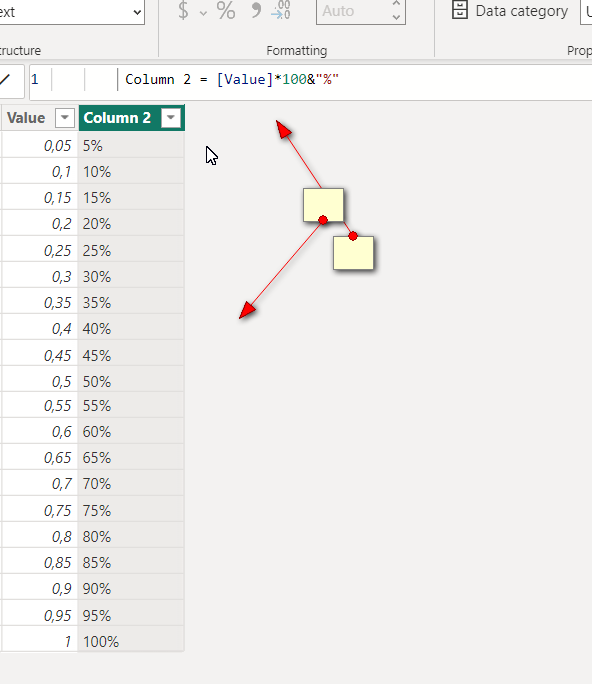
I am still trying to understand why it's happening. however I have found a workaround to display % values.

As a workaround I duplicated the "Value" column , multiplies by 100 and concatenated with "%" symbol. this will be used only for display purpose. In this way I have a column for calculation and other for display.


Best

Anonymous
Not applicable

@bharath_v  thank you for your response. I am generating values like below in the dax,

_1 = GENERATESERIES(0.05, 1.05, 0.05)
bharath_v
Resolver I
Resolver I

Hi @Anonymous 


It could be that the actual values may be exactly equal to the condition.

If you have used precision to cut the source data to 2 decimal points then you may get result like this.


To overcome this, change the precision of the field in the source data itself by going to "Transform Data" and Transform.


Hope this helps!

If I answered your question then pls mark my post as "Accept it as the solution" and a kudo would be appreciated.

Helpful resources

Announcements
FabCon and SQLCon Barcelona 2026

FabCon & SQLCon – Barcelona 2026

Join us in Barcelona for FabCon and SQLCon, the Fabric, Power BI, SQL, and AI community event. Save €200 with code FABCMTY200.

60 days of Data Days Carousel

Data Days 2026

Join Data Days 2026: 60 days of free live/on-demand sessions, challenges, study groups, and certification opportunities.

Power BI DataViz World Championships carousel

Power BI DataViz World Championships - June 2026

A new Power BI DataViz World Championship is coming this June! Don't miss out on submitting your entry.

Top Solution Authors