This time we’re going bigger than ever. Fabric, Power BI, SQL, AI and more. We're covering it all. You won't want to miss it.
Learn moreDid you hear? There's a new SQL AI Developer certification (DP-800). Start preparing now and be one of the first to get certified. Register now
Do you guys help me understand why it is happening?
Thanks
I am still trying to understand why it's happening. however I have found a workaround to display % values.
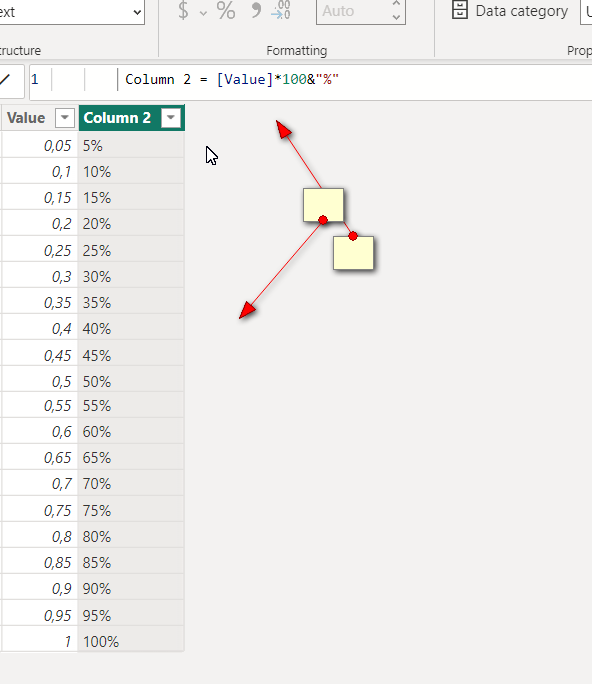
As a workaround I duplicated the "Value" column , multiplies by 100 and concatenated with "%" symbol. this will be used only for display purpose. In this way I have a column for calculation and other for display.
Best
@bharath_v thank you for your response. I am generating values like below in the dax,
Hi @Anonymous
It could be that the actual values may be exactly equal to the condition.
If you have used precision to cut the source data to 2 decimal points then you may get result like this.
To overcome this, change the precision of the field in the source data itself by going to "Transform Data" and Transform.
Hope this helps!
If I answered your question then pls mark my post as "Accept it as the solution" and a kudo would be appreciated.
Check out the April 2026 Power BI update to learn about new features.
Sign up to receive a private message when registration opens and key events begin.
If you have recently started exploring Fabric, we'd love to hear how it's going. Your feedback can help with product improvements.
| User | Count |
|---|---|
| 36 | |
| 33 | |
| 31 | |
| 21 | |
| 16 |
| User | Count |
|---|---|
| 66 | |
| 55 | |
| 31 | |
| 24 | |
| 23 |