cancel
Showing results for 
Search instead for 
Did you mean: 

The Power BI Data Visualization World Championships is back! Get ahead of the game and start preparing now! Learn more

Reply
Anonymous
Not applicable

Switch statement not working

Perc_display =
   SWITCH (
      TRUE (),
      '_1'[Value]= 0.0 , "0%",
      '_1'[Value]= 0.05, "5%",
      '_1'[Value]= 0.10, "10%",
      '_1'[Value]= 0.15, "15%",
      '_1'[Value]= 0.20, "20%",
      '_1'[Value]= 0.25, "25%",
      '_1'[Value]= 0.30, "30%",
      '_1'[Value]= 0.35, "35%",
      '_1'[Value]= 0.40, "40%",
      '_1'[Value]= 0.45,"45%",
      '_1'[Value]= 0.50,"50%",
      '_1'[Value]= 0.55,"55%",
      '_1'[Value]= 0.60,"60%",
      '_1'[Value]= 0.65,"65%",
      '_1'[Value]= 0.70,"70%",
      '_1'[Value]= 0.75,"75%",
      '_1'[Value]= 0.80,"80%",
      '_1'[Value]= 0.85,"85%",
      '_1'[Value]= 0.90,"90%",
      '_1'[Value]= 0.95,"95%",
      '_1'[Value]= 1,"100%",
    "NOt"
)
but it is working for few cases only and I am getting result like below
priyanath1988_0-1678925615317.png


Do you guys help me understand why it is happening?

Thanks 

4 REPLIES 4
Ahmedx
Super User
Super User

Screen Capture #711.png

Anonymous
Not applicable

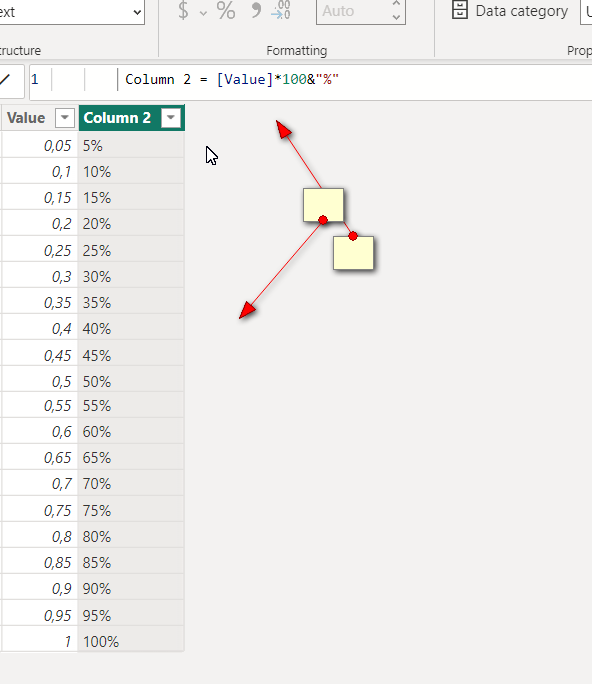
I am still trying to understand why it's happening. however I have found a workaround to display % values.

As a workaround I duplicated the "Value" column , multiplies by 100 and concatenated with "%" symbol. this will be used only for display purpose. In this way I have a column for calculation and other for display.


Best

Anonymous
Not applicable

@bharath_v  thank you for your response. I am generating values like below in the dax,

_1 = GENERATESERIES(0.05, 1.05, 0.05)
bharath_v
Resolver I
Resolver I

Hi @Anonymous 


It could be that the actual values may be exactly equal to the condition.

If you have used precision to cut the source data to 2 decimal points then you may get result like this.


To overcome this, change the precision of the field in the source data itself by going to "Transform Data" and Transform.


Hope this helps!

If I answered your question then pls mark my post as "Accept it as the solution" and a kudo would be appreciated.

Helpful resources

Announcements
Power BI DataViz World Championships

Power BI Dataviz World Championships

The Power BI Data Visualization World Championships is back! Get ahead of the game and start preparing now!

November Power BI Update Carousel

Power BI Monthly Update - November 2025

Check out the November 2025 Power BI update to learn about new features.

FabCon Atlanta 2026 carousel

FabCon Atlanta 2026

Join us at FabCon Atlanta, March 16-20, for the ultimate Fabric, Power BI, AI and SQL community-led event. Save $200 with code FABCOMM.