This is best Fabric, Power BI, SQL and AI community event. How do we know? The last event sold out! Save €200 with code FABCMTY200.
Register nowA new Data Days event is coming soon! This time we’re going bigger than ever. Fabric, Power BI, SQL, AI and more. Don't miss out.
Hello,
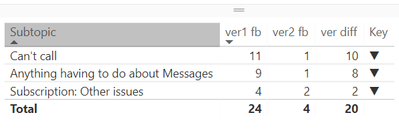
Could somebody please have a look at the switch measure and tell me why it is not working? it should show upper arrow.
Key = SWITCH( TRUE(), [ver1 fb]<[ver2 fb], UNICHAR(9660), [ver1 fb]>[ver2 fb], UNICHAR(9650), UNICHAR(9644) )
Solved! Go to Solution.
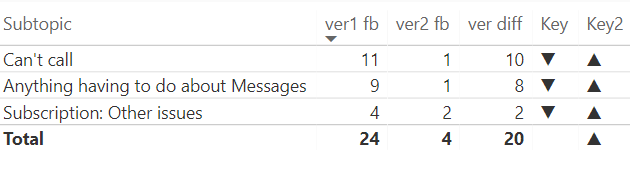
Strange, but the IF f-on works well in this case. Luckely, there is no need for more nested IFs 🙂
Key2 = IF( [ver1 fb]<[ver2 fb], UNICHAR(9660), IF( [ver1 fb]>[ver2 fb], UNICHAR(9650),UNICHAR(9644)) )
Strange, but the IF f-on works well in this case. Luckely, there is no need for more nested IFs 🙂
Key2 = IF( [ver1 fb]<[ver2 fb], UNICHAR(9660), IF( [ver1 fb]>[ver2 fb], UNICHAR(9650),UNICHAR(9644)) )
OK, that's the second one today that I can't recreate. I tried by entering in your data and then adding a calculated column. I used a calculated column because there is no aggregation that would indicate that it is a measure. I get up arrows. I'm on the March 2018 edition.
Hi Greg,
Actually there is aggreagation. Both var1 fb and var2 fb are counts of responses by different criteria.
I am also working on the March edition, but will try to reinstall anyway.
do you maybe have another suggestion? thank you for support though 🙂
OK, so "var1 fb" and "var2 fb" are measures then. I'll try to recreate it with measures.
Check out the May 2026 Power BI update to learn about new features.
Sign up to receive a private message when registration opens and key events begin.
If you have recently started exploring Fabric, we'd love to hear how it's going. Your feedback can help with product improvements.
| User | Count |
|---|---|
| 27 | |
| 25 | |
| 22 | |
| 20 | |
| 14 |
| User | Count |
|---|---|
| 50 | |
| 45 | |
| 20 | |
| 18 | |
| 18 |