Join us at FabCon Atlanta from March 16 - 20, 2026, for the ultimate Fabric, Power BI, AI and SQL community-led event. Save $200 with code FABCOMM.
Register now!The Power BI Data Visualization World Championships is back! It's time to submit your entry. Live now!
Hello,
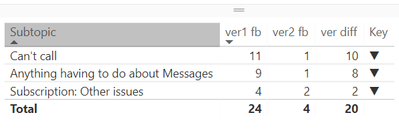
Could somebody please have a look at the switch measure and tell me why it is not working? it should show upper arrow.
Key = SWITCH( TRUE(), [ver1 fb]<[ver2 fb], UNICHAR(9660), [ver1 fb]>[ver2 fb], UNICHAR(9650), UNICHAR(9644) )
Solved! Go to Solution.
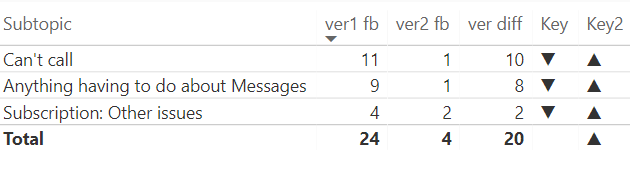
Strange, but the IF f-on works well in this case. Luckely, there is no need for more nested IFs 🙂
Key2 = IF( [ver1 fb]<[ver2 fb], UNICHAR(9660), IF( [ver1 fb]>[ver2 fb], UNICHAR(9650),UNICHAR(9644)) )
Strange, but the IF f-on works well in this case. Luckely, there is no need for more nested IFs 🙂
Key2 = IF( [ver1 fb]<[ver2 fb], UNICHAR(9660), IF( [ver1 fb]>[ver2 fb], UNICHAR(9650),UNICHAR(9644)) )
OK, that's the second one today that I can't recreate. I tried by entering in your data and then adding a calculated column. I used a calculated column because there is no aggregation that would indicate that it is a measure. I get up arrows. I'm on the March 2018 edition.
Hi Greg,
Actually there is aggreagation. Both var1 fb and var2 fb are counts of responses by different criteria.
I am also working on the March edition, but will try to reinstall anyway.
do you maybe have another suggestion? thank you for support though 🙂
OK, so "var1 fb" and "var2 fb" are measures then. I'll try to recreate it with measures.
| User | Count |
|---|---|
| 53 | |
| 40 | |
| 35 | |
| 24 | |
| 22 |
| User | Count |
|---|---|
| 136 | |
| 111 | |
| 58 | |
| 43 | |
| 38 |