Get certified for free when you join Fabric Data Days 2026 and dive into Fabric, Power BI, SQL, AI, and other essential data skills.
Join nowData Days is here! Join us now for 60+ days of learning, challenges, and connection. Learn more
Hello,
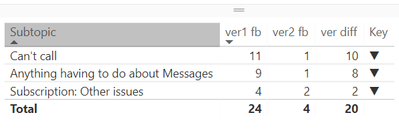
Could somebody please have a look at the switch measure and tell me why it is not working? it should show upper arrow.
Key = SWITCH( TRUE(), [ver1 fb]<[ver2 fb], UNICHAR(9660), [ver1 fb]>[ver2 fb], UNICHAR(9650), UNICHAR(9644) )
Solved! Go to Solution.
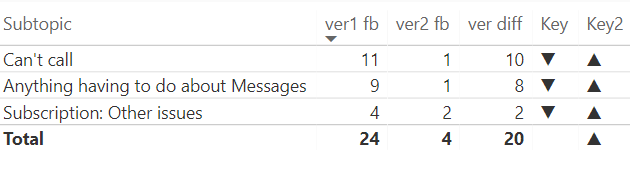
Strange, but the IF f-on works well in this case. Luckely, there is no need for more nested IFs 🙂
Key2 = IF( [ver1 fb]<[ver2 fb], UNICHAR(9660), IF( [ver1 fb]>[ver2 fb], UNICHAR(9650),UNICHAR(9644)) )
Strange, but the IF f-on works well in this case. Luckely, there is no need for more nested IFs 🙂
Key2 = IF( [ver1 fb]<[ver2 fb], UNICHAR(9660), IF( [ver1 fb]>[ver2 fb], UNICHAR(9650),UNICHAR(9644)) )
OK, that's the second one today that I can't recreate. I tried by entering in your data and then adding a calculated column. I used a calculated column because there is no aggregation that would indicate that it is a measure. I get up arrows. I'm on the March 2018 edition.
Hi Greg,
Actually there is aggreagation. Both var1 fb and var2 fb are counts of responses by different criteria.
I am also working on the March edition, but will try to reinstall anyway.
do you maybe have another suggestion? thank you for support though 🙂
OK, so "var1 fb" and "var2 fb" are measures then. I'll try to recreate it with measures.
Don't miss out on Data Days, June 15 through August 7. Learn Fabric, Power BI, SQL, AI and more.
Check out the May 2026 Power BI update to learn about new features.
| User | Count |
|---|---|
| 23 | |
| 23 | |
| 21 | |
| 20 | |
| 15 |
| User | Count |
|---|---|
| 58 | |
| 54 | |
| 42 | |
| 30 | |
| 24 |