cancel
Showing results for 
Search instead for 
Did you mean: 

Join the FabCon + SQLCon recap series. Up next: Power BI, Real-Time Intelligence, IQ and AI, and Data Factory take center stage. All sessions are available on-demand after the live show. Register now

Reply
JamesMurg
Helper I
Helper I

Summarizing data

Morning all I hope you can help me with this one 🙂

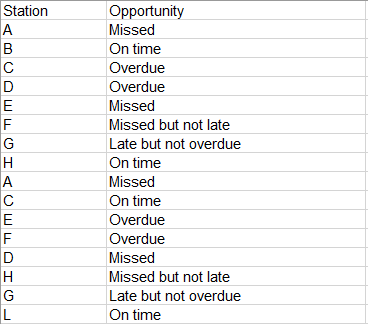
Sample data below:

JamesMurg_1-1688546358770.png


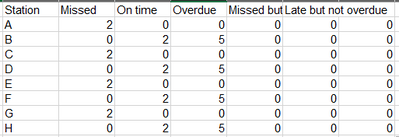
I want a DAX code to summarize and count the number of opportunities, so it comes out like this:

JamesMurg_2-1688546466391.png

Is this possible?

Many thanks in advance

James

3 REPLIES 3
v-yanjiang-msft
Community Support
Community Support

Hi @JamesMurg ,

According to your description, here's my solution.

1.Simply put Station in a matrix Rows, Opportunity in Columns and Values, then select Count in the Values cell, get the result:
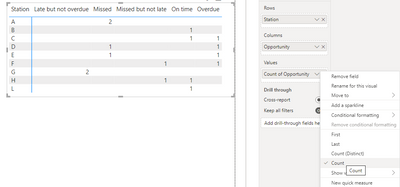
vyanjiangmsft_0-1688699181591.png

2.If you want to show 0 when there isn't value, create a new table, don't make relationship between the two tables.

Station = VALUES('Table'[Station])

Then a measure:

Count =
COUNTROWS (
    FILTER (
        'Table',
        'Table'[Station] = MAX ( 'Station'[Station] )
            && 'Table'[Opportunity] = MAX ( 'Table'[Opportunity] )
    )
) + 0

Put Station from the new table in matrix Rows, Opportunity in Columns and measure Count in Values, get the result:
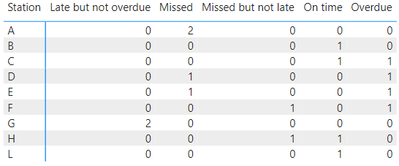
vyanjiangmsft_1-1688699390699.png

I attach my sample below for your reference.


Best regards,

Community Support Team_yanjiang

If this post helps, then please consider Accept it as the solution to help the other members find it more quickly.


Thank you for this but it is not quite what I was looking for and the reason being is that I do not want it in a visual with the values, I need the values to be in the data so I can work out % Vs Volume for each station.  Sorry I forgot to mention this bit.

JamesMurg
Helper I
Helper I

Any help on this please?


Thanks

James

Helpful resources

Announcements
April Power BI Update Carousel

Power BI Monthly Update - April 2026

Check out the April 2026 Power BI update to learn about new features.

New to Fabric survey Carousel

New to Fabric Survey

If you have recently started exploring Fabric, we'd love to hear how it's going. Your feedback can help with product improvements.

Power BI DataViz World Championships carousel

Power BI DataViz World Championships - June 2026

A new Power BI DataViz World Championship is coming this June! Don't miss out on submitting your entry.

FabCon and SQLCon Highlights Carousel

FabCon &SQLCon Highlights

Experience the highlights from FabCon & SQLCon, available live and on-demand starting April 14th.