Get certified for free when you join Fabric Data Days 2026 and dive into Fabric, Power BI, SQL, AI, and other essential data skills.
Join nowData Days is here! Join us now for 60+ days of learning, challenges, and connection. Learn more
Morning all I hope you can help me with this one 🙂
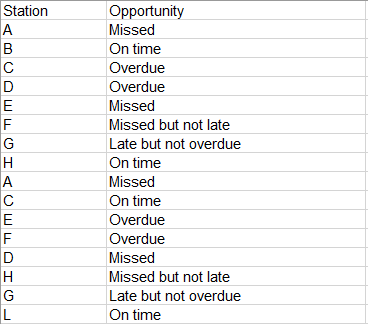
Sample data below:
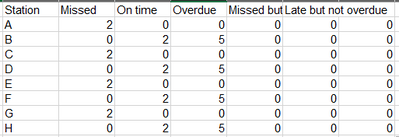
I want a DAX code to summarize and count the number of opportunities, so it comes out like this:
Is this possible?
Many thanks in advance
James
Hi @JamesMurg ,
According to your description, here's my solution.
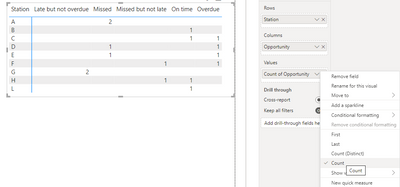
1.Simply put Station in a matrix Rows, Opportunity in Columns and Values, then select Count in the Values cell, get the result:
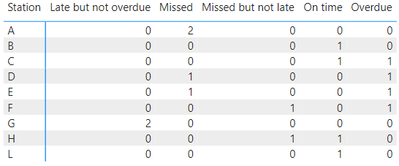
2.If you want to show 0 when there isn't value, create a new table, don't make relationship between the two tables.
Station = VALUES('Table'[Station])
Then a measure:
Count =
COUNTROWS (
FILTER (
'Table',
'Table'[Station] = MAX ( 'Station'[Station] )
&& 'Table'[Opportunity] = MAX ( 'Table'[Opportunity] )
)
) + 0
Put Station from the new table in matrix Rows, Opportunity in Columns and measure Count in Values, get the result:
I attach my sample below for your reference.
Best regards,
Community Support Team_yanjiang
If this post helps, then please consider Accept it as the solution to help the other members find it more quickly.
Thank you for this but it is not quite what I was looking for and the reason being is that I do not want it in a visual with the values, I need the values to be in the data so I can work out % Vs Volume for each station. Sorry I forgot to mention this bit.
Any help on this please?
Thanks
James
Don't miss out on Data Days, June 15 through August 7. Learn Fabric, Power BI, SQL, AI and more.
Check out the May 2026 Power BI update to learn about new features.
| User | Count |
|---|---|
| 23 | |
| 23 | |
| 21 | |
| 17 | |
| 14 |
| User | Count |
|---|---|
| 58 | |
| 50 | |
| 37 | |
| 29 | |
| 24 |