cancel
Showing results for 
Search instead for 
Did you mean: 

The Power BI Data Visualization World Championships is back! Get ahead of the game and start preparing now! Learn more

Reply
JamesMurg
Helper I
Helper I

Summarizing data

Morning all I hope you can help me with this one 🙂

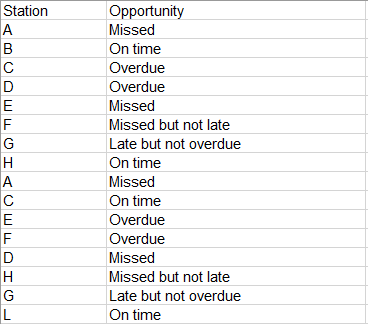
Sample data below:

JamesMurg_1-1688546358770.png


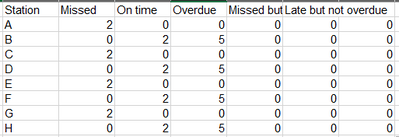
I want a DAX code to summarize and count the number of opportunities, so it comes out like this:

JamesMurg_2-1688546466391.png

Is this possible?

Many thanks in advance

James

3 REPLIES 3
v-yanjiang-msft
Community Support
Community Support

Hi @JamesMurg ,

According to your description, here's my solution.

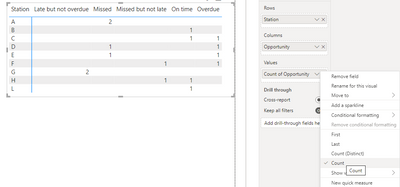
1.Simply put Station in a matrix Rows, Opportunity in Columns and Values, then select Count in the Values cell, get the result:

vyanjiangmsft_0-1688699181591.png

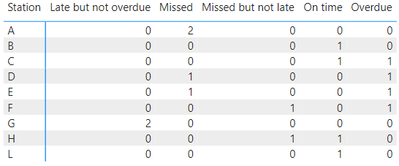
2.If you want to show 0 when there isn't value, create a new table, don't make relationship between the two tables.

Station = VALUES('Table'[Station])

Then a measure:

Count =
COUNTROWS (
    FILTER (
        'Table',
        'Table'[Station] = MAX ( 'Station'[Station] )
            && 'Table'[Opportunity] = MAX ( 'Table'[Opportunity] )
    )
) + 0

Put Station from the new table in matrix Rows, Opportunity in Columns and measure Count in Values, get the result:

vyanjiangmsft_1-1688699390699.png

I attach my sample below for your reference.


Best regards,

Community Support Team_yanjiang

If this post helps, then please consider Accept it as the solution to help the other members find it more quickly.


Thank you for this but it is not quite what I was looking for and the reason being is that I do not want it in a visual with the values, I need the values to be in the data so I can work out % Vs Volume for each station.  Sorry I forgot to mention this bit.

JamesMurg
Helper I
Helper I

Any help on this please?


Thanks

James

Helpful resources

Announcements
Power BI DataViz World Championships

Power BI Dataviz World Championships

The Power BI Data Visualization World Championships is back! Get ahead of the game and start preparing now!

December 2025 Power BI Update Carousel

Power BI Monthly Update - December 2025

Check out the December 2025 Power BI Holiday Recap!

FabCon Atlanta 2026 carousel

FabCon Atlanta 2026

Join us at FabCon Atlanta, March 16-20, for the ultimate Fabric, Power BI, AI and SQL community-led event. Save $200 with code FABCOMM.