We've captured the moments from FabCon & SQLCon that everyone is talking about, and we are bringing them to the community, live and on-demand. Starts on April 14th. Register now
Hello beautiful people. I am new to DAX. Can someone help me convert the following from SQL? i tried to search how to do it, but even though it's nothing special the code itself, i am very confused on how to even start: i Basically want to join some tables and do sum's/Count's .
(select t3.[BK_Date],t2.[BK_Seller],t2.[Supervisor],count(t5.[ID_Call]) as [Call_bys], sum(case when t5.Tipo <> 'External' then 1 else 0 end) as [Call_Tip],
t6.[Available] ,t6.[Available_Time],t6.[Busy_Time],sum(case when t5.[LVL1] = 'Sale' then 1 else 0 end) as Sale, sum(case when t5.[LVL1] = 'Refuse' then 1 else 0 end) as Refuses, t1.Product,sum(t1.Quantity) as Quantity,
sum(case when t5.[LVL1] = 'Callback' then 1 else 0 end) as Callbacks,sum(case when t5.[LVL1] = 'Sale' and t5.[Tipo_Contacto]= 'Callback' then 1 else 0 end) as Sale_Callback from [dbo].[Fact_Tip]
t1 inner join [dbo].[Dim_seller] t2 on t2.[SK_seller] = t1.[FK_seller] inner join [dbo].[Dim_Date] t3 on t3.[BK_Date] = t1.[FK_Date] inner join [dbo].[Dim_Call] t5 on t5.[SK_Call] = t1.FK_Call
inner join [dbo].[Fact_Time] t6 on t6.[FK_seller] = t1. [FK_seller] and t6.FK_Date = t3.[BK_Date] group by
t3.[BK_Date],[BK_seller],[Supervisor],[Available] ,[Available_Time],[Busy_Time],Product)
Solved! Go to Solution.
Hi @Anonymous ,
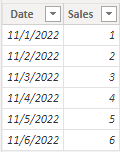
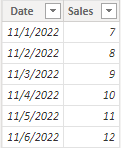
According to your problem "how to sum multiple columns which are on different tables", I create a sample.
Table1:
Table2:
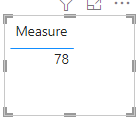
For example we want to sum Sales columns both in Table1 and Table2, simply create a measure:
Measure =
SUM ( 'Table1'[Sales] ) + SUM ( 'Table2'[Sales] )
Result:
If you need further help, you'd better give a sample and the expected result.
I attach my sample below for your reference.
Best Regards,
Community Support Team _ kalyj
If this post helps, then please consider Accept it as the solution to help the other members find it more quickly.
Hi @Anonymous ,
Is your problem solved? If so, would you mind accept the helpful replies as solutions? Then we are able to close the thread. More people who have the same requirment will find the solution quickly and benefit here, thank you!
Best Regards,
Community Support Team _ kalyj
Hi @Anonymous ,
According to your problem "how to sum multiple columns which are on different tables", I create a sample.
Table1:
Table2:
For example we want to sum Sales columns both in Table1 and Table2, simply create a measure:
Measure =
SUM ( 'Table1'[Sales] ) + SUM ( 'Table2'[Sales] )
Result:
If you need further help, you'd better give a sample and the expected result.
I attach my sample below for your reference.
Best Regards,
Community Support Team _ kalyj
If this post helps, then please consider Accept it as the solution to help the other members find it more quickly.
Ok thank you for your answer. but do you know how can i sum multiple columns which are on different tables?
DAX works on a semantic/dimensional model. SQL on a relational one. Very different things and there's no direct translation. One has to know both models to be able to do it. Sorry.
If you have recently started exploring Fabric, we'd love to hear how it's going. Your feedback can help with product improvements.
A new Power BI DataViz World Championship is coming this June! Don't miss out on submitting your entry.
Share feedback directly with Fabric product managers, participate in targeted research studies and influence the Fabric roadmap.
| User | Count |
|---|---|
| 53 | |
| 38 | |
| 33 | |
| 17 | |
| 17 |
| User | Count |
|---|---|
| 67 | |
| 62 | |
| 38 | |
| 34 | |
| 22 |