cancel
Showing results for 
Search instead for 
Did you mean: 

The Power BI Data Visualization World Championships is back! Get ahead of the game and start preparing now! Learn more

Reply
Anonymous
Not applicable

Stacked Graph Creation Help

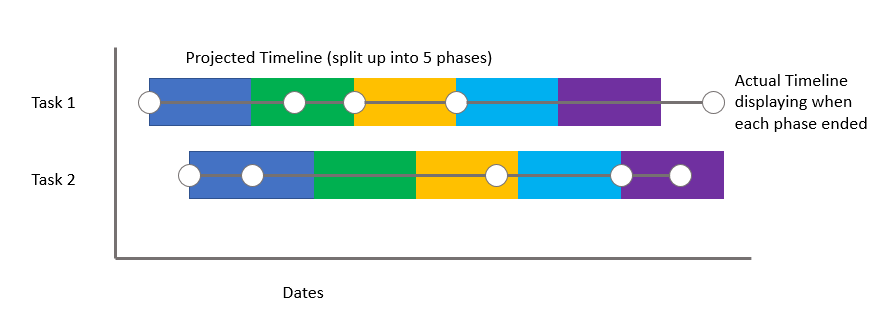
I need a graph that meets the following requirements and looks similar to the image below:


1.  Timeline includes multiple phases for each task (some tasks require 5 phases, while others require 3 phases - If there is a way to accommodate this, that would be great! Otherwise, 5 phases for each will do).

2.  Overlay actual timeline with the projected timeline to show actual project progression.  This should be in the form of a line graph (see below). 


https://imgur.com/a/bFAUJcqCapture.PNG

1 ACCEPTED SOLUTION
v-piga-msft
Resident Rockstar
Resident Rockstar

Hi @Anonymous,


I'm not found the visual as the same as you post above, but I found a similar custom visual Cantt chart which should be meet your requirement.


You could have a good look at this video to create this visual.


Best regards,

Cherry

Community Support Team _ Cherry Gao
If this post helps, then please consider Accept it as the solution to help the other members find it more quickly.

View solution in original post

3 REPLIES 3
MichaelDano
Frequent Visitor

I'm sure why this was accepted as a solution - because it isn't.

The request was to show a task split in 5 phases. Gantt doesn't do that ...

v-piga-msft
Resident Rockstar
Resident Rockstar

Hi @Anonymous,


I'm not found the visual as the same as you post above, but I found a similar custom visual Cantt chart which should be meet your requirement.


You could have a good look at this video to create this visual.


Best regards,

Cherry

Community Support Team _ Cherry Gao
If this post helps, then please consider Accept it as the solution to help the other members find it more quickly.
Anonymous
Not applicable

I am looking to create a chart that's similar to a Gantt Chart for my project.  Can someone please walk me through how to create a graph with the following attributes (see image).


1.  Overlay the actual progression with the projected timeline (one in bar form, the other in line form).

2.  The project timeline should be stacked within 5 different phases of the project (phase 1, phase 2, etc).


Chart


https://imgur.com/a/bFAUJcq 

Helpful resources

Announcements
Power BI DataViz World Championships

Power BI Dataviz World Championships

The Power BI Data Visualization World Championships is back! Get ahead of the game and start preparing now!

December 2025 Power BI Update Carousel

Power BI Monthly Update - December 2025

Check out the December 2025 Power BI Holiday Recap!

FabCon Atlanta 2026 carousel

FabCon Atlanta 2026

Join us at FabCon Atlanta, March 16-20, for the ultimate Fabric, Power BI, AI and SQL community-led event. Save $200 with code FABCOMM.