Don't miss your chance to take the Fabric Data Engineer (DP-600) exam for FREE! Find out how by watching the DP-600 session on-demand now through April 28th.
Learn moreJoin the FabCon + SQLCon recap series. Up next: Power BI, Real-Time Intelligence, IQ and AI, and Data Factory take center stage. All sessions are available on-demand after the live show. Register now
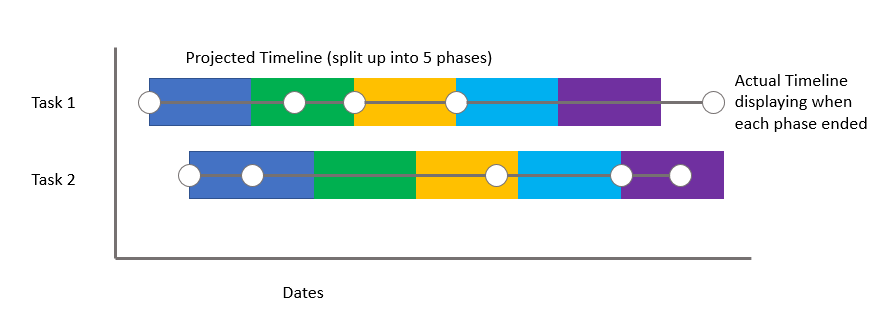
I need a graph that meets the following requirements and looks similar to the image below:
1. Timeline includes multiple phases for each task (some tasks require 5 phases, while others require 3 phases - If there is a way to accommodate this, that would be great! Otherwise, 5 phases for each will do).
2. Overlay actual timeline with the projected timeline to show actual project progression. This should be in the form of a line graph (see below).
Solved! Go to Solution.
Hi @Anonymous,
I'm not found the visual as the same as you post above, but I found a similar custom visual Cantt chart which should be meet your requirement.
You could have a good look at this video to create this visual.
Best regards,
Cherry
I'm sure why this was accepted as a solution - because it isn't.
The request was to show a task split in 5 phases. Gantt doesn't do that ...
Hi @Anonymous,
I'm not found the visual as the same as you post above, but I found a similar custom visual Cantt chart which should be meet your requirement.
You could have a good look at this video to create this visual.
Best regards,
Cherry
I am looking to create a chart that's similar to a Gantt Chart for my project. Can someone please walk me through how to create a graph with the following attributes (see image).
1. Overlay the actual progression with the projected timeline (one in bar form, the other in line form).
2. The project timeline should be stacked within 5 different phases of the project (phase 1, phase 2, etc).
Check out the April 2026 Power BI update to learn about new features.
If you have recently started exploring Fabric, we'd love to hear how it's going. Your feedback can help with product improvements.
A new Power BI DataViz World Championship is coming this June! Don't miss out on submitting your entry.
| User | Count |
|---|---|
| 42 | |
| 37 | |
| 35 | |
| 22 | |
| 15 |
| User | Count |
|---|---|
| 67 | |
| 58 | |
| 29 | |
| 27 | |
| 25 |