cancel
Showing results for 
Search instead for 
Did you mean: 

The Power BI Data Visualization World Championships is back! Get ahead of the game and start preparing now! Learn more

Reply
Yashh
Helper II
Helper II

Specific data

Hello Everyone, 

I wanted help whit my dashboard. I want this data to be displayed in my dashboard for the follwing material.


Yashh_0-1678454961491.png


But when i did I am  getting the follwing data back .


Yashh_1-1678455106610.png

 How can I solve this?


1 ACCEPTED SOLUTION

That is because you are using a Matrix visual. 

Question you need to ask here is do you really need to use the Matrix visual for your case? Or using Table visual will also serve your purpose?


If you can use Table visual, then you can easily opt for this option of "Don't Summarize" the values.


But if your option is only the Matrix visual then unfortunatuely, Matrix visual doesn't allow this option. So, in Matrix visual, you can't really have multiple values against one material (in your case 128) What you can do in this scenario is create a measure like this, 


Material Value = MAX(Table[Material])


Using this measure, you will be able to get the maximum value for your Material (i..e, for Material = 128, it will return max Stock value) but it will ignore all the other values.


View solution in original post

3 REPLIES 3
HassanAshas
Helper V
Helper V

That is because Power BI automatically aggregates the data when you place it in a Matrix.


What you can do is go to your Fields in Power BI and then click on "Sum of Material", and then click on "Dont Summarize"


HassanAshas_0-1678455547837.png


This will fix your problem. 

@HassanAshas  

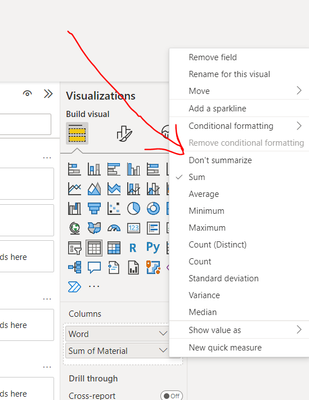
Yashh_0-1678456256638.png

i do not have a option for this.

That is because you are using a Matrix visual. 

Question you need to ask here is do you really need to use the Matrix visual for your case? Or using Table visual will also serve your purpose?


If you can use Table visual, then you can easily opt for this option of "Don't Summarize" the values.


But if your option is only the Matrix visual then unfortunatuely, Matrix visual doesn't allow this option. So, in Matrix visual, you can't really have multiple values against one material (in your case 128) What you can do in this scenario is create a measure like this, 


Material Value = MAX(Table[Material])


Using this measure, you will be able to get the maximum value for your Material (i..e, for Material = 128, it will return max Stock value) but it will ignore all the other values.


Helpful resources

Announcements
Power BI DataViz World Championships

Power BI Dataviz World Championships

The Power BI Data Visualization World Championships is back! Get ahead of the game and start preparing now!

December 2025 Power BI Update Carousel

Power BI Monthly Update - December 2025

Check out the December 2025 Power BI Holiday Recap!

FabCon Atlanta 2026 carousel

FabCon Atlanta 2026

Join us at FabCon Atlanta, March 16-20, for the ultimate Fabric, Power BI, AI and SQL community-led event. Save $200 with code FABCOMM.