Learn from the best! Meet the four finalists headed to the FINALS of the Power BI Dataviz World Championships! Register now
Hello Everyone,
I wanted help whit my dashboard. I want this data to be displayed in my dashboard for the follwing material.

But when i did I am getting the follwing data back .

How can I solve this?
Solved! Go to Solution.
That is because you are using a Matrix visual.
Question you need to ask here is do you really need to use the Matrix visual for your case? Or using Table visual will also serve your purpose?
If you can use Table visual, then you can easily opt for this option of "Don't Summarize" the values.
But if your option is only the Matrix visual then unfortunatuely, Matrix visual doesn't allow this option. So, in Matrix visual, you can't really have multiple values against one material (in your case 128) What you can do in this scenario is create a measure like this,
Material Value = MAX(Table[Material])
Using this measure, you will be able to get the maximum value for your Material (i..e, for Material = 128, it will return max Stock value) but it will ignore all the other values.
That is because Power BI automatically aggregates the data when you place it in a Matrix.
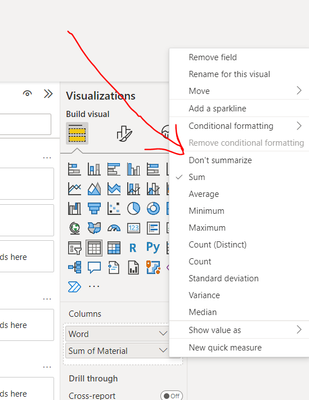
What you can do is go to your Fields in Power BI and then click on "Sum of Material", and then click on "Dont Summarize"
This will fix your problem.
@Anonymous

i do not have a option for this.
That is because you are using a Matrix visual.
Question you need to ask here is do you really need to use the Matrix visual for your case? Or using Table visual will also serve your purpose?
If you can use Table visual, then you can easily opt for this option of "Don't Summarize" the values.
But if your option is only the Matrix visual then unfortunatuely, Matrix visual doesn't allow this option. So, in Matrix visual, you can't really have multiple values against one material (in your case 128) What you can do in this scenario is create a measure like this,
Material Value = MAX(Table[Material])
Using this measure, you will be able to get the maximum value for your Material (i..e, for Material = 128, it will return max Stock value) but it will ignore all the other values.
A new Power BI DataViz World Championship is coming this June! Don't miss out on submitting your entry.
Share feedback directly with Fabric product managers, participate in targeted research studies and influence the Fabric roadmap.
| User | Count |
|---|---|
| 45 | |
| 34 | |
| 27 | |
| 15 | |
| 15 |
| User | Count |
|---|---|
| 58 | |
| 56 | |
| 38 | |
| 22 | |
| 20 |