cancel
Showing results for 
Search instead for 
Did you mean: 

The Power BI Data Visualization World Championships is back! It's time to submit your entry. Live now!

Reply
newgirl
Post Patron
Post Patron

Specific Rows to Have Different Data Type

Hi! 


I was assigned to make a simple table in PBI showing the values provided by the department. Here is a sample layout of the raw data.


KEI/KPITypeSegmentJan-21Feb-21Mar-21Apr-21May-21Jun-21Jul-21Aug-21Sep-21Oct-21Nov-21Dec-21
KPI1BulkBuilders100%100%100%100%        
KPI1BulkDistributor100%100%100%100%        
KPI1BulkIndustrial100%100%100%100%        
KPI1BagBuilders100%99%100%99%        
KPI1BagDistributor100%99%99%97%        
KPI1BagIndustrial95%96%99%79%        
KPI2BulkBuilders99%99%100%99%        
KPI2BulkDistributor100%100%100%100%        
KPI2BulkIndustrial99%99%100%100%        
KPI2BagBuilders97%93%96%88%        
KPI2BagDistributor95%95%96%87%        
KPI2BagIndustrial95%99%95%97%        
KPI3BulkAll3893108116        
KPI3BulkAll9431        
KPI3BagAll785704784779        
KPI3BagAll7659449       


As you can see, the numbers are mostly presented in % except for the KPI3 in which it should be presented in absolute numbers.


In my inital process, I used 'unpivoted' and so all values are now in one column and I added a column to have a date column.

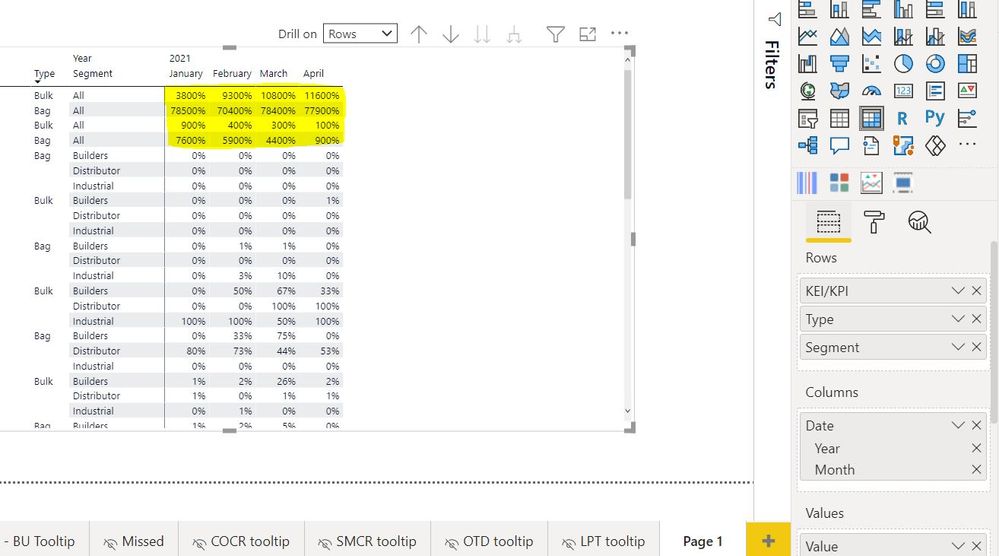
Here is my output. My question is that is there a way for these values (highlighted in yellow) to show as absolute while the rest are in percentages?


values1.JPG

1 ACCEPTED SOLUTION
Jihwan_Kim
Super User
Super User

Hi, @newgirl 

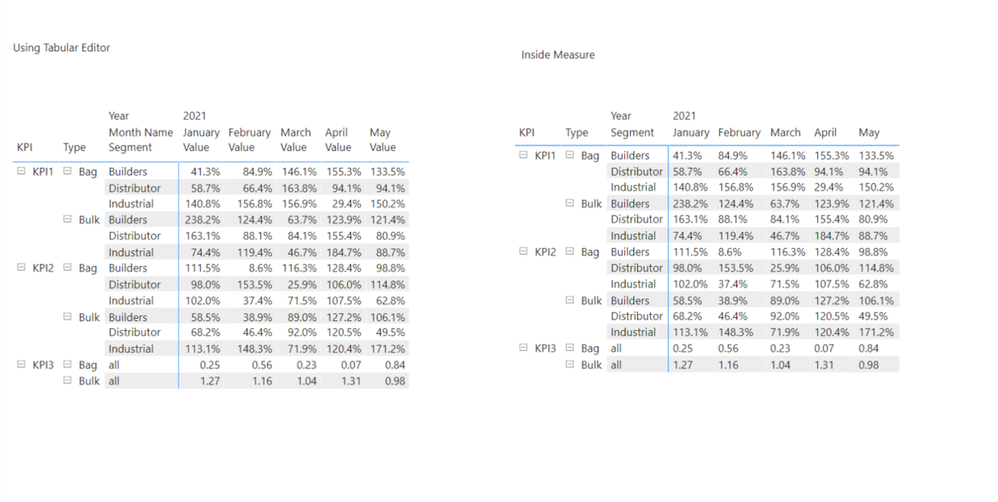
Please check the below picture and the sample pbix file's link down below.

I tried to create a sample based on the explanation.

There are many ways to achieve this, but I suggest two ways like below.


Picture2.png


All measures are in the sample pbix file.


https://www.dropbox.com/s/tdnfq3fk307d5nc/newgirl.pbix?dl=0 


Hi, My name is Jihwan Kim.


If this post helps, then please consider accept it as the solution to help other members find it faster, and give a big thumbs up.


Linkedin: linkedin.com/in/jihwankim1975/

Twitter: twitter.com/Jihwan_JHKIM


If this post helps, then please consider accepting it as the solution to help other members find it faster, and give a big thumbs up.


Click here to visit my LinkedIn page

View solution in original post

2 REPLIES 2
Jihwan_Kim
Super User
Super User

Hi, @newgirl 

Please check the below picture and the sample pbix file's link down below.

I tried to create a sample based on the explanation.

There are many ways to achieve this, but I suggest two ways like below.


Picture2.png


All measures are in the sample pbix file.


https://www.dropbox.com/s/tdnfq3fk307d5nc/newgirl.pbix?dl=0 


Hi, My name is Jihwan Kim.


If this post helps, then please consider accept it as the solution to help other members find it faster, and give a big thumbs up.


Linkedin: linkedin.com/in/jihwankim1975/

Twitter: twitter.com/Jihwan_JHKIM


If this post helps, then please consider accepting it as the solution to help other members find it faster, and give a big thumbs up.


Click here to visit my LinkedIn page

Hello! I did the measure approach and it worked. Thank you so much!

Helpful resources

Announcements
Power BI DataViz World Championships

Power BI Dataviz World Championships

The Power BI Data Visualization World Championships is back! It's time to submit your entry.

January Power BI Update Carousel

Power BI Monthly Update - January 2026

Check out the January 2026 Power BI update to learn about new features.

FabCon Atlanta 2026 carousel

FabCon Atlanta 2026

Join us at FabCon Atlanta, March 16-20, for the ultimate Fabric, Power BI, AI and SQL community-led event. Save $200 with code FABCOMM.