Join us at FabCon Atlanta from March 16 - 20, 2026, for the ultimate Fabric, Power BI, AI and SQL community-led event. Save $200 with code FABCOMM.
Register now!Vote for your favorite vizzies from the Power BI Dataviz World Championship submissions. Vote now!
Hi!
I was assigned to make a simple table in PBI showing the values provided by the department. Here is a sample layout of the raw data.
| KEI/KPI | Type | Segment | Jan-21 | Feb-21 | Mar-21 | Apr-21 | May-21 | Jun-21 | Jul-21 | Aug-21 | Sep-21 | Oct-21 | Nov-21 | Dec-21 |
| KPI1 | Bulk | Builders | 100% | 100% | 100% | 100% | ||||||||
| KPI1 | Bulk | Distributor | 100% | 100% | 100% | 100% | ||||||||
| KPI1 | Bulk | Industrial | 100% | 100% | 100% | 100% | ||||||||
| KPI1 | Bag | Builders | 100% | 99% | 100% | 99% | ||||||||
| KPI1 | Bag | Distributor | 100% | 99% | 99% | 97% | ||||||||
| KPI1 | Bag | Industrial | 95% | 96% | 99% | 79% | ||||||||
| KPI2 | Bulk | Builders | 99% | 99% | 100% | 99% | ||||||||
| KPI2 | Bulk | Distributor | 100% | 100% | 100% | 100% | ||||||||
| KPI2 | Bulk | Industrial | 99% | 99% | 100% | 100% | ||||||||
| KPI2 | Bag | Builders | 97% | 93% | 96% | 88% | ||||||||
| KPI2 | Bag | Distributor | 95% | 95% | 96% | 87% | ||||||||
| KPI2 | Bag | Industrial | 95% | 99% | 95% | 97% | ||||||||
| KPI3 | Bulk | All | 38 | 93 | 108 | 116 | ||||||||
| KPI3 | Bulk | All | 9 | 4 | 3 | 1 | ||||||||
| KPI3 | Bag | All | 785 | 704 | 784 | 779 | ||||||||
| KPI3 | Bag | All | 76 | 59 | 44 | 9 |
|
As you can see, the numbers are mostly presented in % except for the KPI3 in which it should be presented in absolute numbers.
In my inital process, I used 'unpivoted' and so all values are now in one column and I added a column to have a date column.
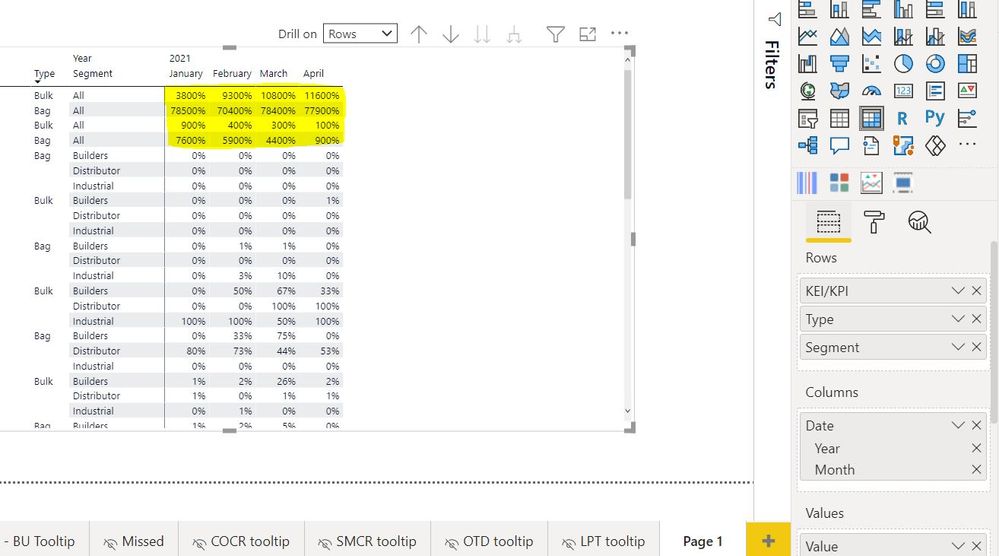
Here is my output. My question is that is there a way for these values (highlighted in yellow) to show as absolute while the rest are in percentages?
Solved! Go to Solution.
Hi, @newgirl
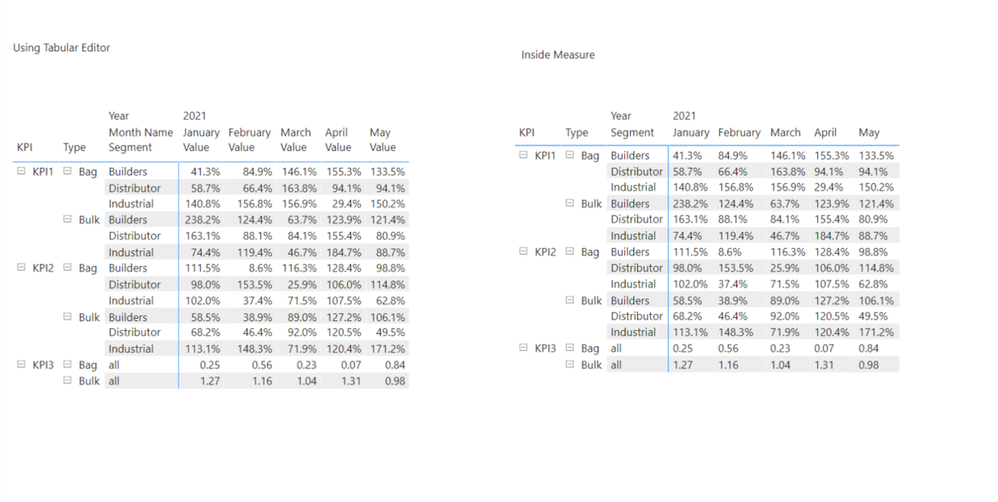
Please check the below picture and the sample pbix file's link down below.
I tried to create a sample based on the explanation.
There are many ways to achieve this, but I suggest two ways like below.
All measures are in the sample pbix file.
https://www.dropbox.com/s/tdnfq3fk307d5nc/newgirl.pbix?dl=0
Hi, My name is Jihwan Kim.
If this post helps, then please consider accept it as the solution to help other members find it faster, and give a big thumbs up.
Linkedin: linkedin.com/in/jihwankim1975/
Twitter: twitter.com/Jihwan_JHKIM
Hi, @newgirl
Please check the below picture and the sample pbix file's link down below.
I tried to create a sample based on the explanation.
There are many ways to achieve this, but I suggest two ways like below.
All measures are in the sample pbix file.
https://www.dropbox.com/s/tdnfq3fk307d5nc/newgirl.pbix?dl=0
Hi, My name is Jihwan Kim.
If this post helps, then please consider accept it as the solution to help other members find it faster, and give a big thumbs up.
Linkedin: linkedin.com/in/jihwankim1975/
Twitter: twitter.com/Jihwan_JHKIM
Hello! I did the measure approach and it worked. Thank you so much!
Vote for your favorite vizzies from the Power BI World Championship submissions!
If you love stickers, then you will definitely want to check out our Community Sticker Challenge!
Check out the January 2026 Power BI update to learn about new features.
| User | Count |
|---|---|
| 64 | |
| 51 | |
| 46 | |
| 23 | |
| 19 |
| User | Count |
|---|---|
| 139 | |
| 112 | |
| 51 | |
| 33 | |
| 29 |