Don't miss your chance to take the Fabric Data Engineer (DP-600) exam for FREE! Find out how by attending the DP-600 session on April 23rd (pacific time), live or on-demand.
Learn moreNext up in the FabCon + SQLCon recap series: The roadmap for Microsoft SQL and Maximizing Developer experiences in Fabric. All sessions are available on-demand after the live show. Register now
I think I may be missing something simple. I uploaded a SQL Server data source with sql code. Example:
(
Select
Name,
Number
from Table
)
When I go into Power BI desktop later, I open the query editor, and go to advanced editor; the query is rewritten and has extra characters because it is using the "Source = Sql.Database" function.
How do I get the SQL query as I put it in? It is annoying to have to edit/format the query everytime I want to make a change.
Note: creating a view or stored procedure source is not an option in this case.
Thanks!
Solved! Go to Solution.
Hi @Anonymous
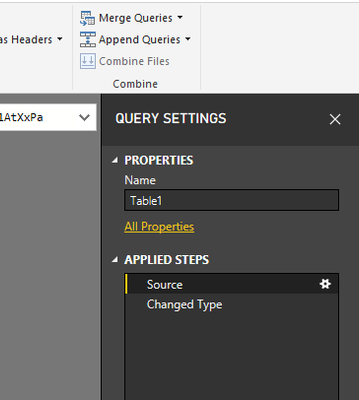
Click on the Gear icon right to Source step in Right Query Settings pane
do not hesitate to give a kudo to useful posts and mark solutions as solution
Hi @Anonymous
Click on the Gear icon right to Source step in Right Query Settings pane
do not hesitate to give a kudo to useful posts and mark solutions as solution
If you have recently started exploring Fabric, we'd love to hear how it's going. Your feedback can help with product improvements.
A new Power BI DataViz World Championship is coming this June! Don't miss out on submitting your entry.
| User | Count |
|---|---|
| 46 | |
| 43 | |
| 39 | |
| 19 | |
| 15 |
| User | Count |
|---|---|
| 68 | |
| 67 | |
| 31 | |
| 27 | |
| 24 |