cancel
Showing results for 
Search instead for 
Did you mean: 

The Power BI Data Visualization World Championships is back! It's time to submit your entry. Live now!

Reply
Anonymous
Not applicable

Source Query - Advanced Editor

I think I may be missing something simple. I uploaded a SQL Server data source with sql code. Example:

(

Select

Name,

Number

from Table

)


When I go into Power BI desktop later, I open the query editor, and go to advanced editor; the query is rewritten and has extra characters because it is using the "Source = Sql.Database" function.


How do I get the SQL query as I put it in? It is annoying to have to edit/format the query everytime I want to make a change.


Note: creating a view or stored procedure source is not an option in this case.


Thanks!

1 ACCEPTED SOLUTION
az38
Community Champion
Community Champion

Hi @Anonymous 

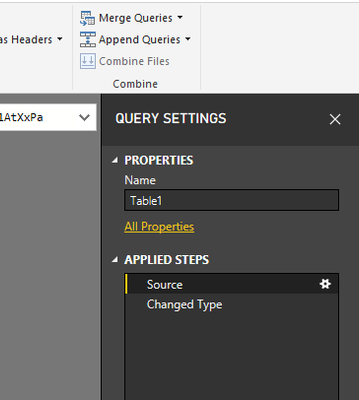
Click on the Gear icon right to Source step in Right Query Settings pane

Безымянный.png


do not hesitate to give a kudo to useful posts and mark solutions as solution


do not hesitate to give a kudo to useful posts and mark solutions as solution
LinkedIn

View solution in original post

1 REPLY 1
az38
Community Champion
Community Champion

Hi @Anonymous 

Click on the Gear icon right to Source step in Right Query Settings pane

Безымянный.png


do not hesitate to give a kudo to useful posts and mark solutions as solution


do not hesitate to give a kudo to useful posts and mark solutions as solution
LinkedIn

Helpful resources

Announcements
FabCon Atlanta 2026 carousel

FabCon Atlanta 2026

Join us at FabCon Atlanta, March 16-20, for the ultimate Fabric, Power BI, AI and SQL community-led event. Save $200 with code FABCOMM.