cancel
Showing results for 
Search instead for 
Did you mean: 

Vote for your favorite vizzies from the Power BI Dataviz World Championship submissions. Vote now!

Reply
Anonymous
Not applicable

Source Query - Advanced Editor

I think I may be missing something simple. I uploaded a SQL Server data source with sql code. Example:

(

Select

Name,

Number

from Table

)


When I go into Power BI desktop later, I open the query editor, and go to advanced editor; the query is rewritten and has extra characters because it is using the "Source = Sql.Database" function.


How do I get the SQL query as I put it in? It is annoying to have to edit/format the query everytime I want to make a change.


Note: creating a view or stored procedure source is not an option in this case.


Thanks!

1 ACCEPTED SOLUTION
az38
Community Champion
Community Champion

Hi @Anonymous 

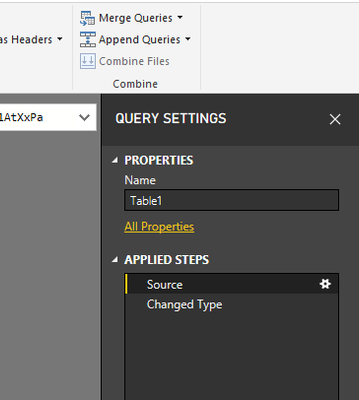
Click on the Gear icon right to Source step in Right Query Settings pane

Безымянный.png


do not hesitate to give a kudo to useful posts and mark solutions as solution


do not hesitate to give a kudo to useful posts and mark solutions as solution
LinkedIn

View solution in original post

1 REPLY 1
az38
Community Champion
Community Champion

Hi @Anonymous 

Click on the Gear icon right to Source step in Right Query Settings pane

Безымянный.png


do not hesitate to give a kudo to useful posts and mark solutions as solution


do not hesitate to give a kudo to useful posts and mark solutions as solution
LinkedIn

Helpful resources

Announcements
Sticker Challenge 2026 Carousel

Join our Community Sticker Challenge 2026

If you love stickers, then you will definitely want to check out our Community Sticker Challenge!

January Power BI Update Carousel

Power BI Monthly Update - January 2026

Check out the January 2026 Power BI update to learn about new features.

FabCon Atlanta 2026 carousel

FabCon Atlanta 2026

Join us at FabCon Atlanta, March 16-20, for the ultimate Fabric, Power BI, AI and SQL community-led event. Save $200 with code FABCOMM.