Don't miss your chance to take the Fabric Data Engineer (DP-700) exam on us!
Learn moreWe've captured the moments from FabCon & SQLCon that everyone is talking about, and we are bringing them to the community, live and on-demand. Starts on April 14th. Register now
I think I may be missing something simple. I uploaded a SQL Server data source with sql code. Example:
(
Select
Name,
Number
from Table
)
When I go into Power BI desktop later, I open the query editor, and go to advanced editor; the query is rewritten and has extra characters because it is using the "Source = Sql.Database" function.
How do I get the SQL query as I put it in? It is annoying to have to edit/format the query everytime I want to make a change.
Note: creating a view or stored procedure source is not an option in this case.
Thanks!
Solved! Go to Solution.
Hi @Anonymous
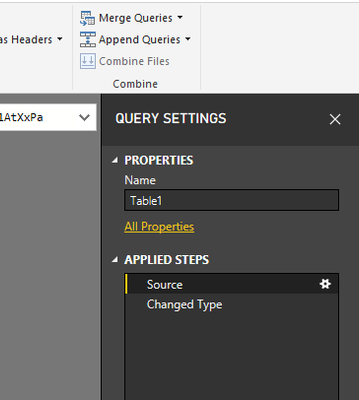
Click on the Gear icon right to Source step in Right Query Settings pane
do not hesitate to give a kudo to useful posts and mark solutions as solution
Hi @Anonymous
Click on the Gear icon right to Source step in Right Query Settings pane
do not hesitate to give a kudo to useful posts and mark solutions as solution
If you have recently started exploring Fabric, we'd love to hear how it's going. Your feedback can help with product improvements.
A new Power BI DataViz World Championship is coming this June! Don't miss out on submitting your entry.
Share feedback directly with Fabric product managers, participate in targeted research studies and influence the Fabric roadmap.
| User | Count |
|---|---|
| 55 | |
| 40 | |
| 36 | |
| 20 | |
| 18 |
| User | Count |
|---|---|
| 73 | |
| 72 | |
| 38 | |
| 35 | |
| 26 |