Get certified for free when you join Fabric Data Days 2026 and dive into Fabric, Power BI, SQL, AI, and other essential data skills.
Join nowJuly 7 - July 17 | Round 2 of the Power BI Dataviz World Championships. Don't miss your chance! Learn more
Hi!
How do I sort a stacked bar chart by age group in ascending order?
From Below 18 Years old to 65+ Years old?
Thanks!
Solved! Go to Solution.
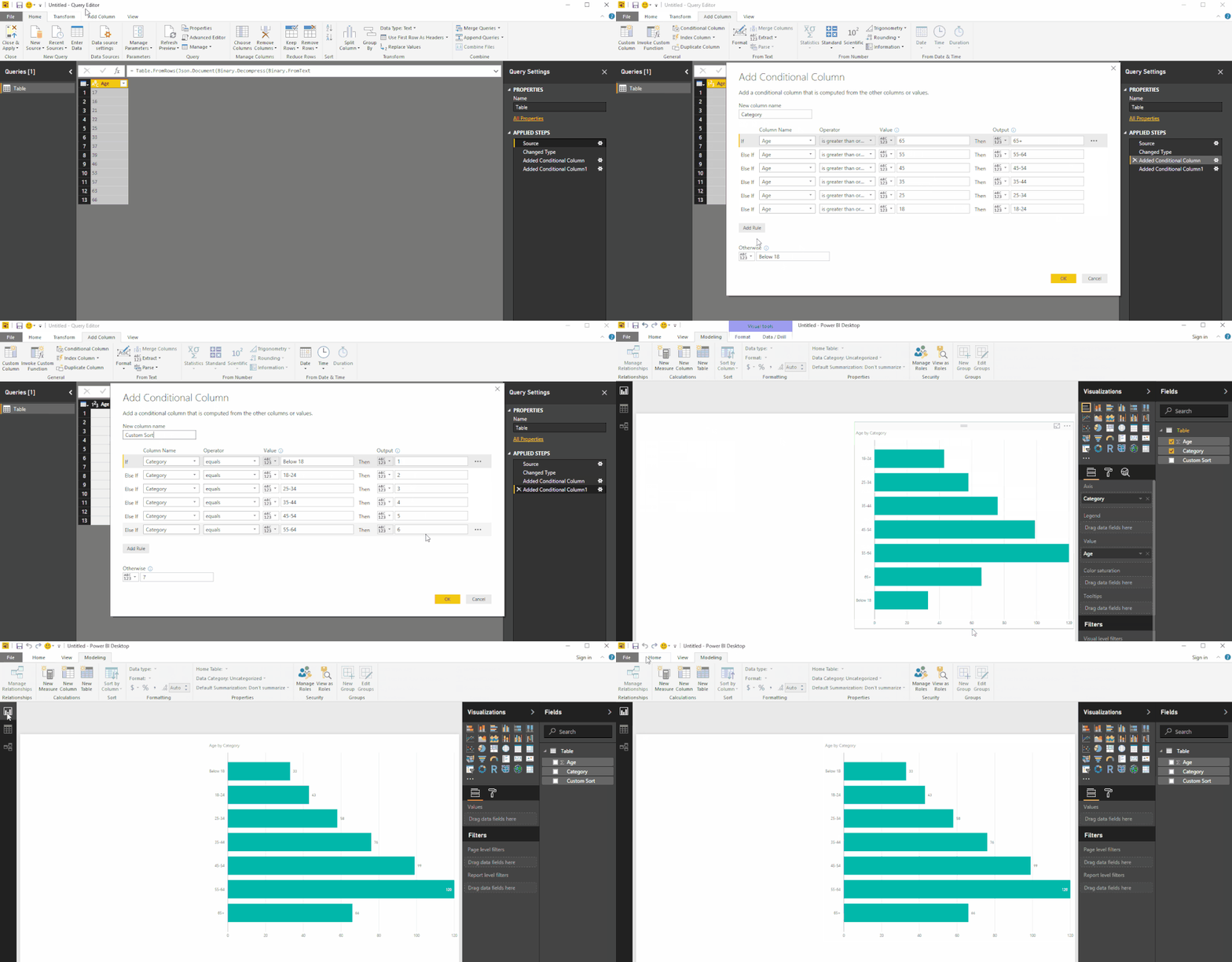
I take it you've created those "Bins" with a conditional column
I'm calling this column Category in the image below
Then I use it to create another Column called Custom Sort which we'll use to sort the Bars
See image below - let me know if you have any questions...
Hope this helps! ![]()
EDIT: I've used the Query Editor for both columns
but you can use SWITCH statements (nested IFs) to get the same results with DAX created columns! ![]()
Click the ellipses ... in the top right corner of the Visual - Sort By
I already tried it but the result looks like this:
In my mind it shoutd be:
Below 18 Years Old
18-24 Years Old
25-34 Years Old
35-44 Years Old
45-54 Years Old
55-64 Years Old
65+ Years Old
is there a way to manually sort it?
Thanks!
I take it you've created those "Bins" with a conditional column
I'm calling this column Category in the image below
Then I use it to create another Column called Custom Sort which we'll use to sort the Bars
See image below - let me know if you have any questions...
Hope this helps! ![]()
EDIT: I've used the Query Editor for both columns
but you can use SWITCH statements (nested IFs) to get the same results with DAX created columns! ![]()
Thanks! I got it! 🙂
What books do you recommend in using the powerbi more effectively and efficiently?
Thanks!
| User | Count |
|---|---|
| 23 | |
| 22 | |
| 20 | |
| 20 | |
| 12 |
| User | Count |
|---|---|
| 63 | |
| 56 | |
| 47 | |
| 44 | |
| 37 |