Get certified for free when you join Fabric Data Days 2026 and dive into Fabric, Power BI, SQL, AI, and other essential data skills.
Join nowData Days is here! Join us now for 60+ days of learning, challenges, and connection. Learn more
Hi!
How do I sort a stacked bar chart by age group in ascending order?
From Below 18 Years old to 65+ Years old?
Thanks!
Solved! Go to Solution.
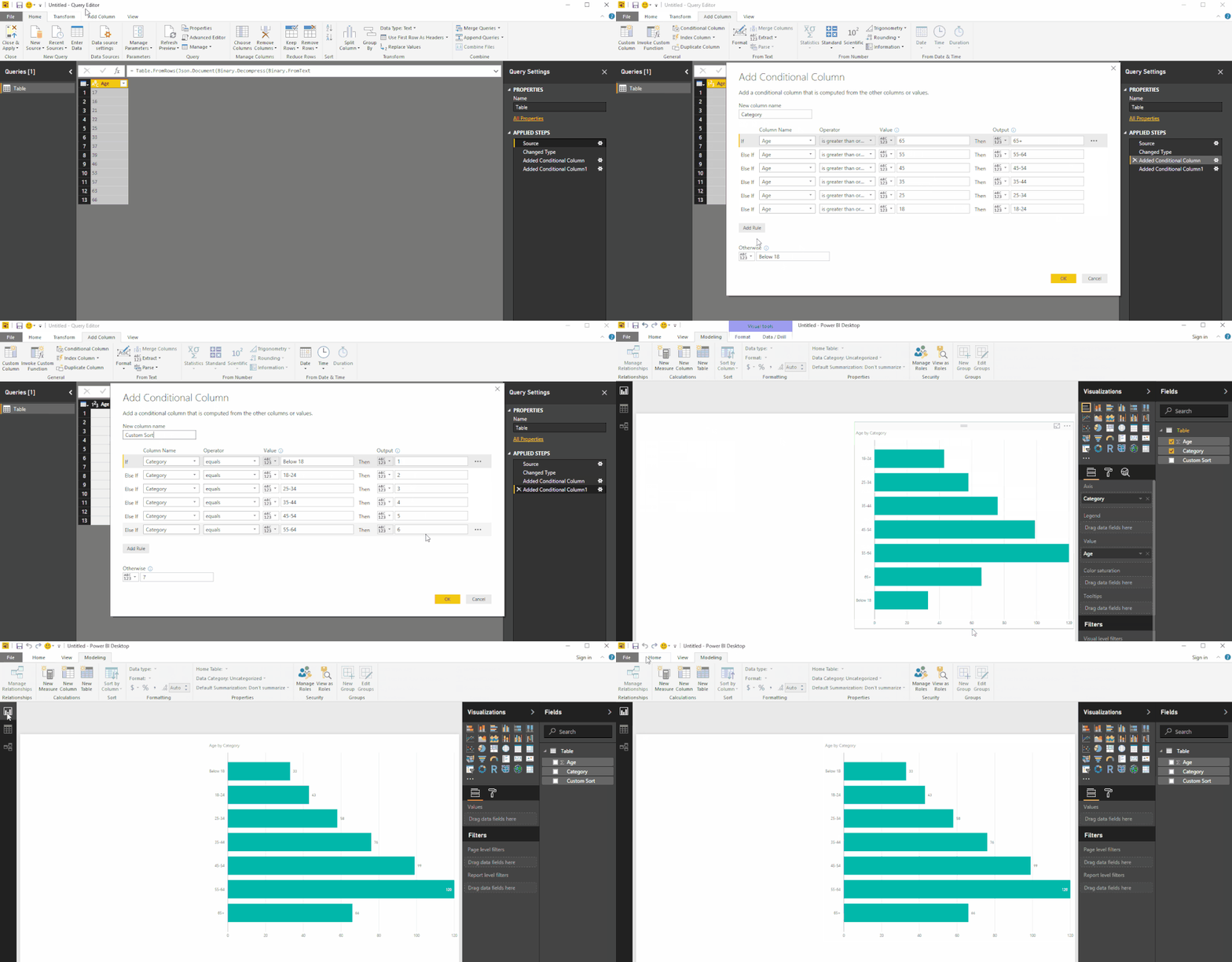
I take it you've created those "Bins" with a conditional column
I'm calling this column Category in the image below
Then I use it to create another Column called Custom Sort which we'll use to sort the Bars
See image below - let me know if you have any questions...
Hope this helps! ![]()
EDIT: I've used the Query Editor for both columns
but you can use SWITCH statements (nested IFs) to get the same results with DAX created columns! ![]()
Click the ellipses ... in the top right corner of the Visual - Sort By
I already tried it but the result looks like this:
In my mind it shoutd be:
Below 18 Years Old
18-24 Years Old
25-34 Years Old
35-44 Years Old
45-54 Years Old
55-64 Years Old
65+ Years Old
is there a way to manually sort it?
Thanks!
I take it you've created those "Bins" with a conditional column
I'm calling this column Category in the image below
Then I use it to create another Column called Custom Sort which we'll use to sort the Bars
See image below - let me know if you have any questions...
Hope this helps! ![]()
EDIT: I've used the Query Editor for both columns
but you can use SWITCH statements (nested IFs) to get the same results with DAX created columns! ![]()
Thanks! I got it! 🙂
What books do you recommend in using the powerbi more effectively and efficiently?
Thanks!
Don't miss out on Data Days, June 15 through August 7. Learn Fabric, Power BI, SQL, AI and more.
Check out the May 2026 Power BI update to learn about new features.
| User | Count |
|---|---|
| 23 | |
| 23 | |
| 21 | |
| 20 | |
| 15 |
| User | Count |
|---|---|
| 58 | |
| 55 | |
| 43 | |
| 30 | |
| 24 |