
Don't miss your chance to take the Fabric Data Engineer (DP-600) exam for FREE! Find out how by attending the DP-600 session on April 23rd (pacific time), live or on-demand.
Learn moreNext up in the FabCon + SQLCon recap series: The roadmap for Microsoft SQL and Maximizing Developer experiences in Fabric. All sessions are available on-demand after the live show. Register now
Hi All,
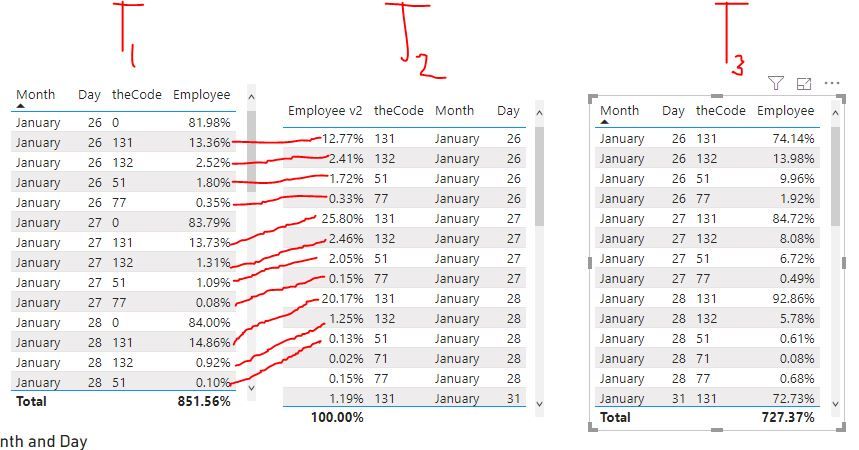
T1 has the correct values in the 'Employee' column.
I want to create another table , T2, that list the corresponding values in another column, Employee v2, except the code '0' in the 'theCode' column.
If I filter '0' out of 'theCode' column I end up with the undesired values in T3.
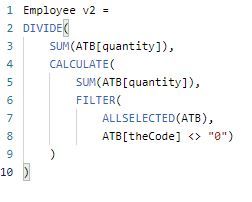
Below is the measurs that has been provided to me for 'Employee' column and the 'Employee v2' column.
It is hard to see exactly what is going on because your measures references columns we cannot see and I don't know how your model looks. You are using ALLSELECTED too but I don't know how as there are no slicers or anything else showing how selection is working.
That said, your v1 measure is saying:
Divide the Sum of the ATB Quantity in this filter context by the Sum of the ATB Quantity for all selectect records where the theDate = the Max value of theDate.
Your V2 measure is saying:
Divide the Sum of the ATB Quantity in this filter context by the Sum of the ATB Quantity for selected records but exclude any quantities where theCode <> 0.
If there are any quanties for records where theCode <> 0, then your divisor will be different (and it obviously is) so you should get a different answer.
DAX is for Analysis. Power Query is for Data Modeling
Proud to be a Super User!
MCSA: BI ReportingSorry I am not being clear.
I also left out the column 'quantity' in the previous tables.
I want to create another table or measure that allows me to have the same values in the 'Employee' column and leave out '0' in the 'theCode' column.
So I can have another table/measure that looks like below
| Month | Day | theCode | quantity | Employee |
| January | 26 | 131 | 774 | 13.36% |
| January | 26 | 132 | 146 | 2.52% |
| January | 26 | 51 | 104 | 1.80% |
| January | 26 | 77 | 20 | 0.35% |
| January | 27 | 131 | 1563 | 13.73% |
| January | 27 | 132 | 149 | 1.31% |
| January | 27 | 51 | 124 | 1.09% |
| January | 27 | 77 | 9 | 0.08% |
| January | 28 | 131 | 1222 | 14.86% |
| January | 28 | 132 | 76 | 0.92% |
| January | 28 | 51 | 8 | 0.10% |
Your FILTER() to exlcude the 0 code cannot exist if you want the results to be the same. Get rid of that filter. Just use ALL(TableName) for the filter, then filter the "0" codes out on a visual level filter in the filter pane. The calc should be the same because it will include the effect of the 0 code, but will exclude it from view.
If that doesn't work, please post a PBIX file. It would take someone a long time to key in all of that data and try and guess what your model is and what other filter contexts are in play to help future. You can easily share via OneDrive or DropBox. Just use fake non-confidential data.
DAX is for Analysis. Power Query is for Data Modeling
Proud to be a Super User!
MCSA: BI ReportingIf you have recently started exploring Fabric, we'd love to hear how it's going. Your feedback can help with product improvements.
A new Power BI DataViz World Championship is coming this June! Don't miss out on submitting your entry.
Share feedback directly with Fabric product managers, participate in targeted research studies and influence the Fabric roadmap.
| User | Count |
|---|---|
| 44 | |
| 43 | |
| 38 | |
| 19 | |
| 15 |
| User | Count |
|---|---|
| 68 | |
| 64 | |
| 31 | |
| 29 | |
| 24 |