cancel
Showing results for 
Search instead for 
Did you mean: 

The Power BI Data Visualization World Championships is back! Get ahead of the game and start preparing now! Learn more

Reply
Anonymous
Not applicable

Slider not working on dynamic Top N

Hello,

I having problem with dynamic TopN selection.

I could do the dynamic top N selection for my report.

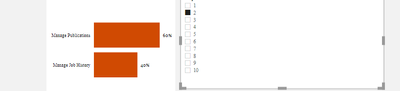
But the problem I am facing is it's working only on List or on dropdown.

alpha_123_0-1619708348027.png

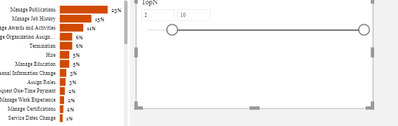
I want to do it on slider. But not working...

alpha_123_1-1619708398876.png


The measure I am using is =


TOPN =

VAR SelectedTop= SELECTEDVALUE(TopN[TOPN])
Return
SWITCH(TRUE(),
SelectedTop=0, [Measure],
RANKX(
ALLSELECTED(Table[filed]),
[Measure]
)
<=SelectedTop,
[Measure]
)


Can you tell me why it's not working on slider?

1 ACCEPTED SOLUTION
Anonymous
Not applicable

@amitchandak Thank you..the example that you have given helped me.

View solution in original post

4 REPLIES 4
amitchandak
Super User
Super User

@Anonymous , Try like


OPN =
VAR _min= minx(allselected(TopN),TopN[TOPN])
VAR _max= maxx(allselected(TopN),TopN[TOPN])
Return
SWITCH(TRUE(),
SelectedTop=0, [Measure],
RANKX(
ALLSELECTED(Table[filed]),
[Measure]
)
<=Max,
[Measure]
)


also refer : https://community.powerbi.com/t5/Community-Blog/Dynamic-TopN-made-easy-with-What-If-Parameter/ba-p/367415

Share with Power BI Enthusiasts: Full Power BI Video (20 Hours) YouTube
Microsoft Fabric Series 60+ Videos YouTube
Microsoft Fabric Hindi End to End YouTube
Anonymous
Not applicable

@amitchandak , its not working..I am referring the same post.....it only working with list,dropdown...

@Anonymous , Please check page last 2 page (20,21) 

Share with Power BI Enthusiasts: Full Power BI Video (20 Hours) YouTube
Microsoft Fabric Series 60+ Videos YouTube
Microsoft Fabric Hindi End to End YouTube
Anonymous
Not applicable

@amitchandak Thank you..the example that you have given helped me.

Helpful resources

Announcements
November Power BI Update Carousel

Power BI Monthly Update - November 2025

Check out the November 2025 Power BI update to learn about new features.

Fabric Data Days Carousel

Fabric Data Days

Advance your Data & AI career with 50 days of live learning, contests, hands-on challenges, study groups & certifications and more!

FabCon Atlanta 2026 carousel

FabCon Atlanta 2026

Join us at FabCon Atlanta, March 16-20, for the ultimate Fabric, Power BI, AI and SQL community-led event. Save $200 with code FABCOMM.

Top Solution Authors
Top Kudoed Authors