
Join us at FabCon Atlanta from March 16 - 20, 2026, for the ultimate Fabric, Power BI, AI and SQL community-led event. Save $200 with code FABCOMM.
Register now!The Power BI Data Visualization World Championships is back! Get ahead of the game and start preparing now! Learn more
Hello,
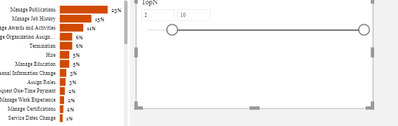
I having problem with dynamic TopN selection.
I could do the dynamic top N selection for my report.
But the problem I am facing is it's working only on List or on dropdown.
I want to do it on slider. But not working...
The measure I am using is =
TOPN =
Can you tell me why it's not working on slider?
Solved! Go to Solution.
@Anonymous , Try like
OPN =
VAR _min= minx(allselected(TopN),TopN[TOPN])
VAR _max= maxx(allselected(TopN),TopN[TOPN])
Return
SWITCH(TRUE(),
SelectedTop=0, [Measure],
RANKX(
ALLSELECTED(Table[filed]),
[Measure]
)
<=Max,
[Measure]
)
also refer : https://community.powerbi.com/t5/Community-Blog/Dynamic-TopN-made-easy-with-What-If-Parameter/ba-p/367415
@amitchandak , its not working..I am referring the same post.....it only working with list,dropdown...
The Power BI Data Visualization World Championships is back! Get ahead of the game and start preparing now!
Check out the November 2025 Power BI update to learn about new features.
| User | Count |
|---|---|
| 59 | |
| 43 | |
| 42 | |
| 23 | |
| 17 |
| User | Count |
|---|---|
| 190 | |
| 122 | |
| 96 | |
| 66 | |
| 47 |