cancel
Showing results for 
Search instead for 
Did you mean: 

The Power BI Data Visualization World Championships is back! It's time to submit your entry. Live now!

Reply
Colinu
Helper I
Helper I

Slicer

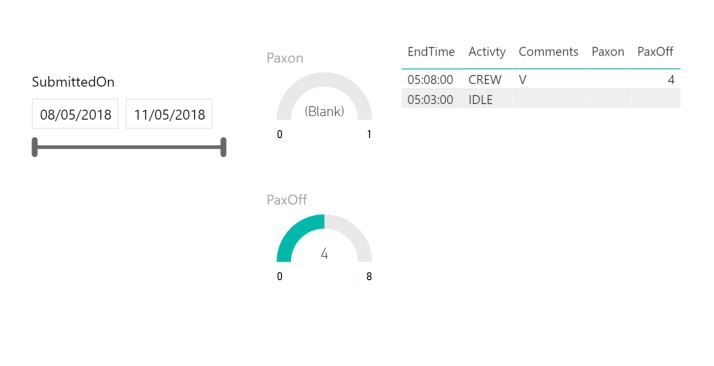
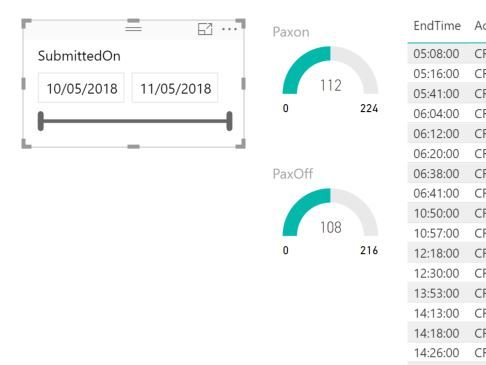
I have a slicer on my visual and i cant understadn why it's not working. 


My understanding is that when i adjust the slicer to the date range i need it should filter the linked data / visuals to show data in that range.


In this example the data entries are on the 10th and by defualt the data is displayed correctly. when i extend the date range the data reduceses. i woul dhave though that any range the slicer is adjusted to will disply the data included within that range. 


can anyone point me in the right direction as i can see what i am doing wrong hereCapture 2.JPGCapture.JPG

3 REPLIES 3
muzik113
Frequent Visitor

you can see the slicer bar didn't adapt, generally you should try to confirm the date by pressing enter and clicking to another graph.

it's not user friendly but works!

Thanks but i have tried that and it didnt solve the issues. i tried to manualy move the slider and it would not work?


Anonymous
Not applicable

As a test, maybe you could create a duplicate column but change the format of the date/time and then try a slicer on that?  I'm just wondering of PBI is having an issue with format.  Just a thought.

Helpful resources

Announcements
Power BI DataViz World Championships

Power BI Dataviz World Championships

The Power BI Data Visualization World Championships is back! It's time to submit your entry.

January Power BI Update Carousel

Power BI Monthly Update - January 2026

Check out the January 2026 Power BI update to learn about new features.

FabCon Atlanta 2026 carousel

FabCon Atlanta 2026

Join us at FabCon Atlanta, March 16-20, for the ultimate Fabric, Power BI, AI and SQL community-led event. Save $200 with code FABCOMM.