
cancel
Showing results for 
Search instead for 
Did you mean: 

The Power BI Data Visualization World Championships is back! Get ahead of the game and start preparing now! Learn more

Reply
unclejemima
Post Patron
Post Patron

Simple Multi IF then statement help please :-)

Can someone give me a quick example of a multi IF then statement?


Example.  Table[ABC]


IF(Table[ABC] >1, "Greater Than One"),IF(Table[ABC] =0, "Zero", IF(Table[ABC] <1, "Less Than One")


Basically I'm trying to define multiple numerical states in text with one formula.


Thank you!!

1 ACCEPTED SOLUTION

Hi unclejemima,


From your description, I create sample data to reproduce the scenario.  For your reply above, the reason getting error message is missing comma as picture below.

1.png


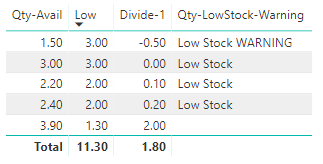
To work around the issue, you can create column named "Divide-1" and measure named "Qty-LowStock-Warning" using multi IF then statement to implement your demand.

Divide-1 = DIVIDE(Inventry[Qty-Avail],Inventry[Low])-1


Qty-LowStock-Warning =

IF(SUM('Inventry'[Divide-1]) >= 0 && SUM('Inventry'[Divide-1]) <= 0.25,

"Low Stock",

IF(SUM('Inventry'[Divide-1]) < 0,

"Low Stock WARNING",

blank())

)


Choose table visual to display the result showing picture below.


3.png


Here is my test pbix file link: https://qiuyunus-my.sharepoint.com/:u:/g/personal/pbipro_qiuyunus_onmicrosoft_com/EU8iDDYMpadMpAqL1V...


Best Regards,

Amy


If this post helps, then please consider Accept it as the solution to help the other members find it more quickly.

View solution in original post

5 REPLIES 5
unclejemima
Post Patron
Post Patron

Ok, here is my actual example...it looks like it should work but I'm getting a "The syntax for "Low Stock Warning" is incorrect,


Is this because I can't use a text result for this?  Here is my formula...


Qty-LowStock-Warning = 
IF(Inventry[Qty-Avail]/Inventry[Low]-1 >= 0 && Inventry[Qty-Avail]/Inventry[Low]-1 <= 0.25,
"Low Stock",
IF(Inventry[Qty-Avail]/Inventry[Low]-1 < 0
"Low Stock WARNING",
blank())
)

Anyone? 🙂

Hi unclejemima,


From your description, I create sample data to reproduce the scenario.  For your reply above, the reason getting error message is missing comma as picture below.

1.png


To work around the issue, you can create column named "Divide-1" and measure named "Qty-LowStock-Warning" using multi IF then statement to implement your demand.

Divide-1 = DIVIDE(Inventry[Qty-Avail],Inventry[Low])-1


Qty-LowStock-Warning =

IF(SUM('Inventry'[Divide-1]) >= 0 && SUM('Inventry'[Divide-1]) <= 0.25,

"Low Stock",

IF(SUM('Inventry'[Divide-1]) < 0,

"Low Stock WARNING",

blank())

)


Choose table visual to display the result showing picture below.


3.png


Here is my test pbix file link: https://qiuyunus-my.sharepoint.com/:u:/g/personal/pbipro_qiuyunus_onmicrosoft_com/EU8iDDYMpadMpAqL1V...


Best Regards,

Amy


If this post helps, then please consider Accept it as the solution to help the other members find it more quickly.

Thank you!!!!  One silly comma.  Very much apprecaite your help!!!  Marked as solved! 🙂

Hey that should work.  I'll give it a go!

Helpful resources

Announcements
Power BI DataViz World Championships

Power BI Dataviz World Championships

The Power BI Data Visualization World Championships is back! Get ahead of the game and start preparing now!

December 2025 Power BI Update Carousel

Power BI Monthly Update - December 2025

Check out the December 2025 Power BI Holiday Recap!

FabCon Atlanta 2026 carousel

FabCon Atlanta 2026

Join us at FabCon Atlanta, March 16-20, for the ultimate Fabric, Power BI, AI and SQL community-led event. Save $200 with code FABCOMM.