Join us at FabCon Atlanta from March 16 - 20, 2026, for the ultimate Fabric, Power BI, AI and SQL community-led event. Save $200 with code FABCOMM.
Register now!The Power BI Data Visualization World Championships is back! It's time to submit your entry. Live now!
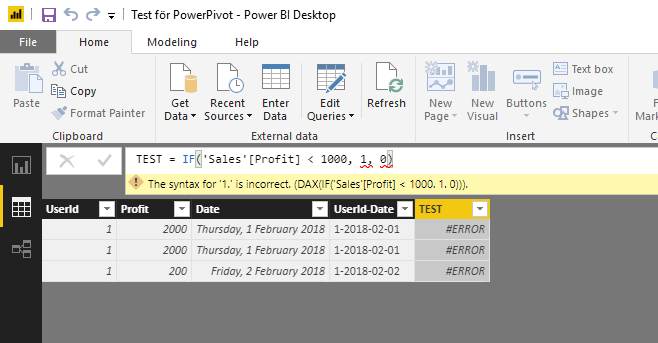
IF-statement in it's simplest form is causing issues.
"Profit" is of datatype "Whole number".
What's wrong here? Running desktop version 2.58.5103.501.
Solved! Go to Solution.
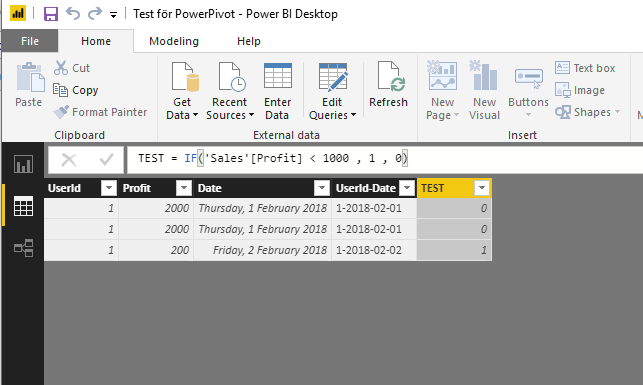
The problem was a missing White-space after "1000".
I have never had any problems with it before..
This works ;o
Hey,
I'm not sure, but do you need to use ";" instead of "," as a separator of arguments?
Check your regional settings at the OS level.
Regards
Tom
if this is calculated measure then 'Sales'[Profit] >1 is comparing a column (multiple values) with scalar, which won't work
this syntax should work fine for calculated column though
The problem was a missing White-space after "1000".
I have never had any problems with it before..
This works ;o
you can have none or multiple whitespaces in the syntax, for sure that wasn't the reason for the measure not working
I agree it does look strange.
But here I have two pictures taken a few seconds ago.
Must be some strange OS-culture bug.
| User | Count |
|---|---|
| 53 | |
| 40 | |
| 31 | |
| 24 | |
| 22 |
| User | Count |
|---|---|
| 134 | |
| 111 | |
| 57 | |
| 44 | |
| 37 |