cancel
Showing results for 
Search instead for 
Did you mean: 

Get Fabric Certified for FREE during AI Skills Fest. This week only. Secure your voucher now.

Reply
nftgamesendaya
Frequent Visitor

Show those employees with consecutive values below a certain value

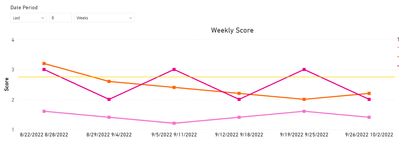
I would like to know how to show those employees that have score below target value (ex. 2.75).


1. 3 consecutive weeks below 2.75

2. 4 consecutive weeks below 2.75 

2. 4 consecutive weeks below 2.75 in the last 6 weeks


Should be based on the slicer value also (number of last nth weeks).


nftgamesendaya_0-1664372583246.png


please advise @amitchandak @Greg_Deckler @Anonymous 

1 ACCEPTED SOLUTION

Hi @nftgamesendaya ,

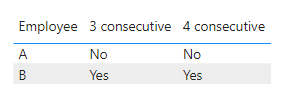
I just want to show which employee has reached the limit. Certainly you can change it to yes or no

vkalyjmsft_0-1664531016858.png

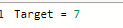
Target is a measure to show the certain value like 2.75 in your example.

vkalyjmsft_1-1664531080954.png

You can alse download my pbix. file I attached below to see more details.


Best Regards,
Community Support Team _ kalyj

If this post helps, then please consider Accept it as the solution to help the other members find it more quickly.

View solution in original post

4 REPLIES 4
v-yanjiang-msft
Community Support
Community Support

Hi @nftgamesendaya ,

Is your problem solved? If so, would you mind accept the helpful replies as solutions? Then we are able to close the thread. More people who have the same requirment will find the solution quickly and benefit here, thank you!


Best Regards,
Community Support Team _ kalyj

v-yanjiang-msft
Community Support
Community Support

Hi @nftgamesendaya ,

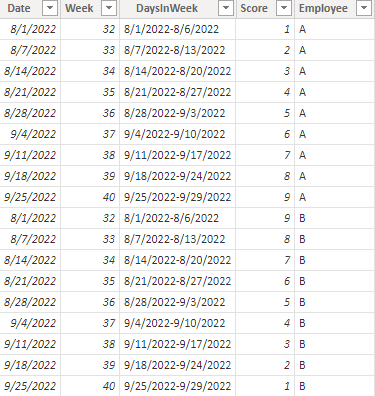
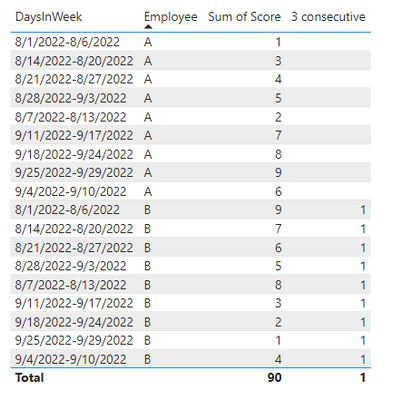
According to your description, I create a sample.

vkalyjmsft_0-1664446423059.png

Here's my solution.

Create a measure.

3 consecutive =
VAR _MAX =
    MAXX ( ALL ( 'Table' ), 'Table'[Week] )
RETURN
    IF (
        SUMX (
            FILTER (
                ALL ( 'Table' ),
                'Table'[Week] = _MAX
                    && 'Table'[Employee] = MAX ( 'Table'[Employee] )
            ),
            'Table'[Score]
        ) < [Target]
            && SUMX (
                FILTER (
                    ALL ( 'Table' ),
                    'Table'[Week] = _MAX - 1
                        && 'Table'[Employee] = MAX ( 'Table'[Employee] )
                ),
                'Table'[Score]
            ) < [Target]
            && SUMX (
                FILTER (
                    ALL ( 'Table' ),
                    'Table'[Week] = _MAX - 2
                        && 'Table'[Employee] = MAX ( 'Table'[Employee] )
                ),
                'Table'[Score]
            ) < [Target],
        1
    )

Get the result.

vkalyjmsft_1-1664446506112.png

Best Regards,
Community Support Team _ kalyj

If this post helps, then please consider Accept it as the solution to help the other members find it more quickly.


hi @v-yanjiang-msft , appreciate the time you alloted on this inquiry. I'm not sure though what does the 3 consecutive column do? What I want to know is to identify which employee has a.) 3 consecutive weeks with below target score (ex. 2.75). Also not sure what is the value you've set for [TARGET]. Please advise. Thank you.

Hi @nftgamesendaya ,

I just want to show which employee has reached the limit. Certainly you can change it to yes or no

vkalyjmsft_0-1664531016858.png

Target is a measure to show the certain value like 2.75 in your example.

vkalyjmsft_1-1664531080954.png

You can alse download my pbix. file I attached below to see more details.


Best Regards,
Community Support Team _ kalyj

If this post helps, then please consider Accept it as the solution to help the other members find it more quickly.

Helpful resources

Announcements
May Power BI Update Carousel

Power BI Monthly Update - May 2026

Check out the May 2026 Power BI update to learn about new features.

Fabric SQL PBI Data Days

Data Days 2026 coming soon!

Sign up to receive a private message when registration opens and key events begin.

New to Fabric survey Carousel

New to Fabric Survey

If you have recently started exploring Fabric, we'd love to hear how it's going. Your feedback can help with product improvements.

Power BI DataViz World Championships carousel

Power BI DataViz World Championships - June 2026

A new Power BI DataViz World Championship is coming this June! Don't miss out on submitting your entry.