Get certified for free when you join Fabric Data Days 2026 and dive into Fabric, Power BI, SQL, AI, and other essential data skills.
Join nowData Days is here! Join us now for 60+ days of learning, challenges, and connection. Learn more
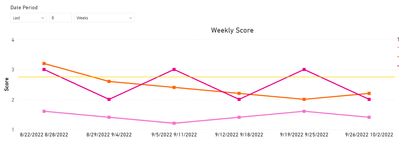
I would like to know how to show those employees that have score below target value (ex. 2.75).
1. 3 consecutive weeks below 2.75
2. 4 consecutive weeks below 2.75
2. 4 consecutive weeks below 2.75 in the last 6 weeks
Should be based on the slicer value also (number of last nth weeks).
please advise @amitchandak @Greg_Deckler @Anonymous
Solved! Go to Solution.
Hi @nftgamesendaya ,
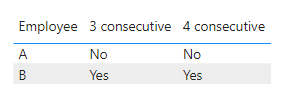
I just want to show which employee has reached the limit. Certainly you can change it to yes or no
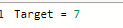
Target is a measure to show the certain value like 2.75 in your example.
You can alse download my pbix. file I attached below to see more details.
Best Regards,
Community Support Team _ kalyj
If this post helps, then please consider Accept it as the solution to help the other members find it more quickly.
Hi @nftgamesendaya ,
Is your problem solved? If so, would you mind accept the helpful replies as solutions? Then we are able to close the thread. More people who have the same requirment will find the solution quickly and benefit here, thank you!
Best Regards,
Community Support Team _ kalyj
Hi @nftgamesendaya ,
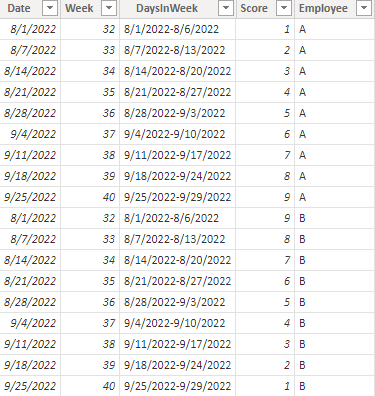
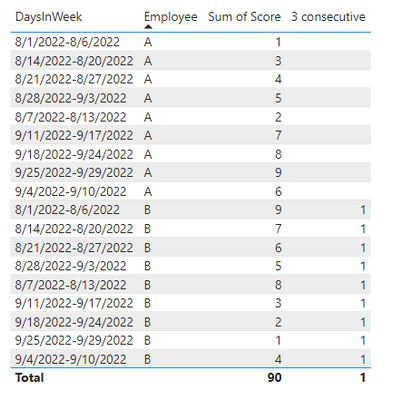
According to your description, I create a sample.
Here's my solution.
Create a measure.
3 consecutive =
VAR _MAX =
MAXX ( ALL ( 'Table' ), 'Table'[Week] )
RETURN
IF (
SUMX (
FILTER (
ALL ( 'Table' ),
'Table'[Week] = _MAX
&& 'Table'[Employee] = MAX ( 'Table'[Employee] )
),
'Table'[Score]
) < [Target]
&& SUMX (
FILTER (
ALL ( 'Table' ),
'Table'[Week] = _MAX - 1
&& 'Table'[Employee] = MAX ( 'Table'[Employee] )
),
'Table'[Score]
) < [Target]
&& SUMX (
FILTER (
ALL ( 'Table' ),
'Table'[Week] = _MAX - 2
&& 'Table'[Employee] = MAX ( 'Table'[Employee] )
),
'Table'[Score]
) < [Target],
1
)
Get the result.
Best Regards,
Community Support Team _ kalyj
If this post helps, then please consider Accept it as the solution to help the other members find it more quickly.
hi @v-yanjiang-msft , appreciate the time you alloted on this inquiry. I'm not sure though what does the 3 consecutive column do? What I want to know is to identify which employee has a.) 3 consecutive weeks with below target score (ex. 2.75). Also not sure what is the value you've set for [TARGET]. Please advise. Thank you.
Hi @nftgamesendaya ,
I just want to show which employee has reached the limit. Certainly you can change it to yes or no
Target is a measure to show the certain value like 2.75 in your example.
You can alse download my pbix. file I attached below to see more details.
Best Regards,
Community Support Team _ kalyj
If this post helps, then please consider Accept it as the solution to help the other members find it more quickly.
Don't miss out on Data Days, June 15 through August 7. Learn Fabric, Power BI, SQL, AI and more.
Check out the May 2026 Power BI update to learn about new features.
| User | Count |
|---|---|
| 23 | |
| 23 | |
| 20 | |
| 18 | |
| 14 |
| User | Count |
|---|---|
| 58 | |
| 52 | |
| 42 | |
| 30 | |
| 24 |