Get certified for free when you join Fabric Data Days 2026 and dive into Fabric, Power BI, SQL, AI, and other essential data skills.
Join nowData Days is here! Join us now for 60+ days of learning, challenges, and connection. Learn more
Hi,
Below is my sample data, can I create a scatter chart "length vs width"?
Objective: For the same serial number, is there a trendline between length vs width, length vs height, width vs height
Actul data has more >50 parameters and millions of rows.
| serial number | Parameter | Value |
| 1111 | Length | 10.1 |
| 2222 | Length | 10.2 |
| 3333 | Length | 10.1 |
| 1111 | width | 5.2 |
| 2222 | width | 5.3 |
| 3333 | width | 5.1 |
| 1111 | height | 2.1 |
| 2222 | height | 2.2 |
| 3333 | height | 2.4 |
Solved! Go to Solution.
Create the following measures in your table.
LengthMeasure = CALCULATE(SUM('Length table'[Value]),FILTER('Length table','Length table'[Parameter]="Length"))
widthmeasure = CALCULATE(SUM('Length table'[Value]),FILTER('Length table','Length table'[Parameter]="width"))
heightmeasure = CALCULATE(SUM('Length table'[Value]),FILTER('Length table','Length table'[Parameter]="height"))
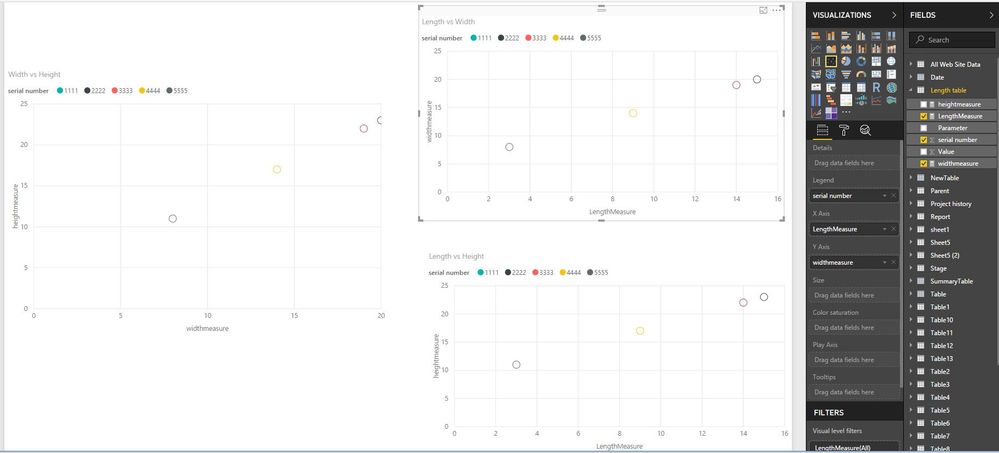
Then create scatter chart as shown in the following screenshot. Please note that in this case, it is not possible to parameter slicer to filter the charts.
Regards,
Lydia
So, what would be an example of what you would like to see as output?
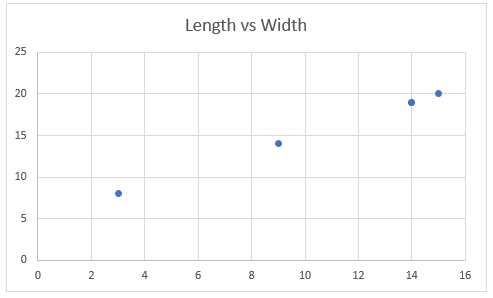
Updated table values and below is a sample chart (length vs width).
At some point, I will also need a slicer to select "length" and "width".
| serial number | Parameter | Value |
| 1111 | Length | 14 |
| 2222 | Length | 15 |
| 3333 | Length | 14 |
| 4444 | Length | 9 |
| 5555 | Length | 3 |
| 1111 | width | 19 |
| 2222 | width | 20 |
| 3333 | width | 19 |
| 4444 | width | 14 |
| 5555 | width | 8 |
| 1111 | height | 22 |
| 2222 | height | 23 |
| 3333 | height | 22 |
| 4444 | height | 17 |
| 5555 | height | 11 |
Create the following measures in your table.
LengthMeasure = CALCULATE(SUM('Length table'[Value]),FILTER('Length table','Length table'[Parameter]="Length"))
widthmeasure = CALCULATE(SUM('Length table'[Value]),FILTER('Length table','Length table'[Parameter]="width"))
heightmeasure = CALCULATE(SUM('Length table'[Value]),FILTER('Length table','Length table'[Parameter]="height"))
Then create scatter chart as shown in the following screenshot. Please note that in this case, it is not possible to parameter slicer to filter the charts.
Regards,
Lydia
Don't miss out on Data Days, June 15 through August 7. Learn Fabric, Power BI, SQL, AI and more.
Check out the May 2026 Power BI update to learn about new features.
| User | Count |
|---|---|
| 23 | |
| 23 | |
| 20 | |
| 18 | |
| 14 |
| User | Count |
|---|---|
| 58 | |
| 51 | |
| 40 | |
| 30 | |
| 24 |