Don't miss your chance to take the Fabric Data Engineer (DP-700) exam on us!
Learn moreThe FabCon + SQLCon recap series starts April 14th at 8am Pacific. If you’re tracking where AI is going inside Fabric, this first session is a can't miss. Register now
Hi,
Below is my sample data, can I create a scatter chart "length vs width"?
Objective: For the same serial number, is there a trendline between length vs width, length vs height, width vs height
Actul data has more >50 parameters and millions of rows.
| serial number | Parameter | Value |
| 1111 | Length | 10.1 |
| 2222 | Length | 10.2 |
| 3333 | Length | 10.1 |
| 1111 | width | 5.2 |
| 2222 | width | 5.3 |
| 3333 | width | 5.1 |
| 1111 | height | 2.1 |
| 2222 | height | 2.2 |
| 3333 | height | 2.4 |
Solved! Go to Solution.
Create the following measures in your table.
LengthMeasure = CALCULATE(SUM('Length table'[Value]),FILTER('Length table','Length table'[Parameter]="Length"))
widthmeasure = CALCULATE(SUM('Length table'[Value]),FILTER('Length table','Length table'[Parameter]="width"))
heightmeasure = CALCULATE(SUM('Length table'[Value]),FILTER('Length table','Length table'[Parameter]="height"))
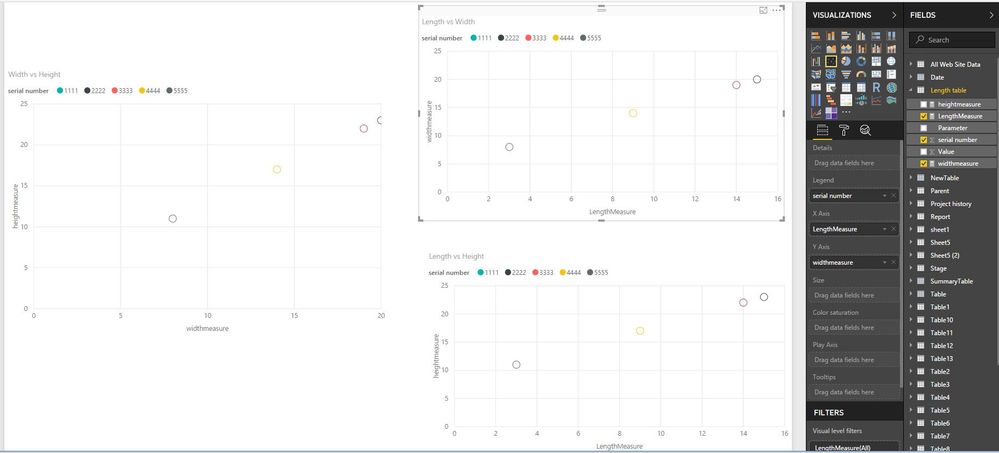
Then create scatter chart as shown in the following screenshot. Please note that in this case, it is not possible to parameter slicer to filter the charts.
Regards,
Lydia
So, what would be an example of what you would like to see as output?
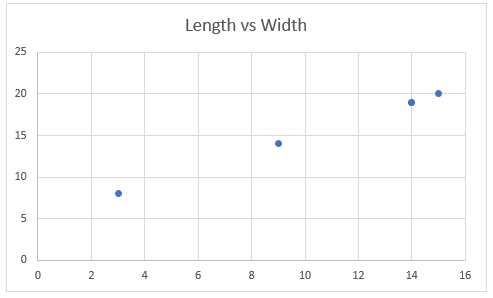
Updated table values and below is a sample chart (length vs width).
At some point, I will also need a slicer to select "length" and "width".
| serial number | Parameter | Value |
| 1111 | Length | 14 |
| 2222 | Length | 15 |
| 3333 | Length | 14 |
| 4444 | Length | 9 |
| 5555 | Length | 3 |
| 1111 | width | 19 |
| 2222 | width | 20 |
| 3333 | width | 19 |
| 4444 | width | 14 |
| 5555 | width | 8 |
| 1111 | height | 22 |
| 2222 | height | 23 |
| 3333 | height | 22 |
| 4444 | height | 17 |
| 5555 | height | 11 |
Create the following measures in your table.
LengthMeasure = CALCULATE(SUM('Length table'[Value]),FILTER('Length table','Length table'[Parameter]="Length"))
widthmeasure = CALCULATE(SUM('Length table'[Value]),FILTER('Length table','Length table'[Parameter]="width"))
heightmeasure = CALCULATE(SUM('Length table'[Value]),FILTER('Length table','Length table'[Parameter]="height"))
Then create scatter chart as shown in the following screenshot. Please note that in this case, it is not possible to parameter slicer to filter the charts.
Regards,
Lydia
If you have recently started exploring Fabric, we'd love to hear how it's going. Your feedback can help with product improvements.
A new Power BI DataViz World Championship is coming this June! Don't miss out on submitting your entry.
Share feedback directly with Fabric product managers, participate in targeted research studies and influence the Fabric roadmap.
| User | Count |
|---|---|
| 53 | |
| 39 | |
| 37 | |
| 19 | |
| 18 |
| User | Count |
|---|---|
| 69 | |
| 67 | |
| 34 | |
| 33 | |
| 30 |