cancel
Showing results for 
Search instead for 
Did you mean: 

Join the FabCon + SQLCon recap series. Up next: Power BI, Real-Time Intelligence, IQ and AI, and Data Factory take center stage. All sessions are available on-demand after the live show. Register now

Reply
drtaylor1701
New Member

Salesforce Connector Issues

Hello! I've been working on several projects using Salesforce, and therefore the Salesforce connector (both Object and Report connectors, really) and just within the last few days have run into a problem - I simply cannot connect to Salesforce anymore. If I attempt to sign in, I recieve a message telling me that Access to the Resource is Forbidden. I've reached out to our Salesforce admins but I've been told repeatedly that there is nothing wrong with my account and they don't see any reason why this would happen on the Salesforce side. Other connectors remain unimpacted. This happens in the desktop app, yes, but also in the Power BI service. I'm something of a novice with Power BI but others on my team are also stumped. Can anyone give me an idea of where I might look next?


A quick summary of actions taken:

Confirmed that the connector works for other team members

Cleared cache/cookies in browser, tried incognito tab (no effect)
Attempted to edit data source settings in Power BI (no effect)
Reinstalled Power BI Desktop (no effect)
Reset Salesforce Security token (no effect)
Tried turning it off and then back on again (the computer - no effect, didn't really expect one but you know someone will ask at some point)

3 REPLIES 3
CoderZen08
Helper V
Helper V

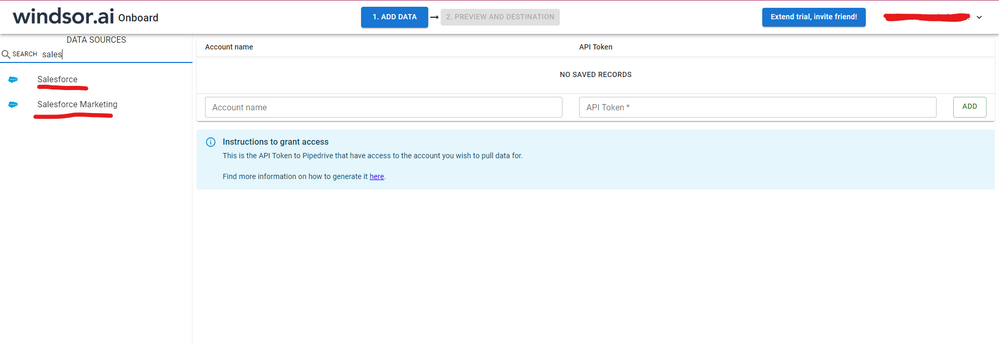
Hi @drtaylor1701 were you able to find a solution? As a workaround, maybe you can try to test your connection with a 3rd party connector. I've tried windsor.ai, supermetrics and funnel.io. I stayed with windsor because it is much cheaper so just to let you know other options. In case you wonder, to make the connection first search for the Salesforce connector in the data sources list:


SALESFORCE-1.png


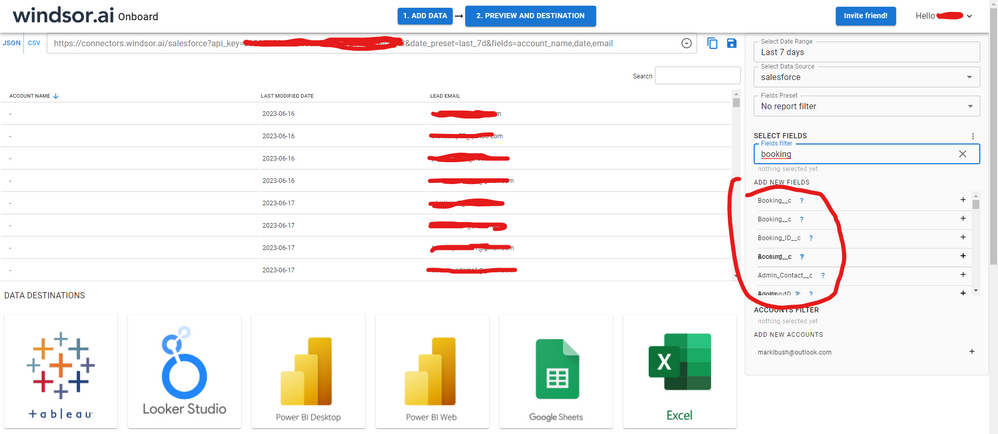
After that, just grant access to your Salesforce account using your credentials, then on preview and destination page you will see a preview of your Salesforce fields:


SALESFORCE-2.png


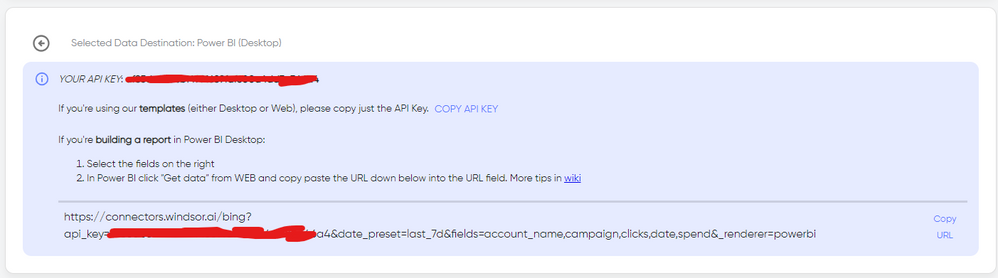
 There just select the fields you need. It is also compatible with custom fields and custom objects, so you'll be able to export them through windsor.  Finally, just select PBI as your data destination and finally just copy and paste the url on PBI --> Get Data --> Web --> Paste the url. 


SELECT_DESTINATION_NEW.png

Anonymous
Not applicable

Hi @drtaylor1701 ,

Could you please check if your license to Salesforce reach the quota limit? Please refer to the similar thread: Solved: Can't connect to Salesforce Objects - Microsoft Power BI Community


How to Get Your Question Answered Quickly 


If it does not help, please provide more details.


Best Regards
Community Support Team _ Rongtie

If this post helps, then please consider Accept it as the solution to help the other members find it more quickly.

drtaylor1701
New Member

Update: I revoked all the connections cached in Salesforce and attempted to sign in again. Same results.

Helpful resources

Announcements
April Power BI Update Carousel

Power BI Monthly Update - April 2026

Check out the April 2026 Power BI update to learn about new features.

New to Fabric survey Carousel

New to Fabric Survey

If you have recently started exploring Fabric, we'd love to hear how it's going. Your feedback can help with product improvements.

Power BI DataViz World Championships carousel

Power BI DataViz World Championships - June 2026

A new Power BI DataViz World Championship is coming this June! Don't miss out on submitting your entry.

FabCon and SQLCon Highlights Carousel

FabCon &SQLCon Highlights

Experience the highlights from FabCon & SQLCon, available live and on-demand starting April 14th.