This time we’re going bigger than ever. Fabric, Power BI, SQL, AI and more. We're covering it all. You won't want to miss it.
Learn moreLevel up your Power BI skills this month - build one visual each week and tell better stories with data! Get started
Hello! I've been working on several projects using Salesforce, and therefore the Salesforce connector (both Object and Report connectors, really) and just within the last few days have run into a problem - I simply cannot connect to Salesforce anymore. If I attempt to sign in, I recieve a message telling me that Access to the Resource is Forbidden. I've reached out to our Salesforce admins but I've been told repeatedly that there is nothing wrong with my account and they don't see any reason why this would happen on the Salesforce side. Other connectors remain unimpacted. This happens in the desktop app, yes, but also in the Power BI service. I'm something of a novice with Power BI but others on my team are also stumped. Can anyone give me an idea of where I might look next?
A quick summary of actions taken:
Confirmed that the connector works for other team members
Cleared cache/cookies in browser, tried incognito tab (no effect)
Attempted to edit data source settings in Power BI (no effect)
Reinstalled Power BI Desktop (no effect)
Reset Salesforce Security token (no effect)
Tried turning it off and then back on again (the computer - no effect, didn't really expect one but you know someone will ask at some point)
Hi @drtaylor1701,
For anyone bumping into this thread with the same "Forbidden" issue and already exhausted the usual cache-clearing, security-token-resetting, reinstall-Power-BI rounds - there's an AppExchange alternative called Metrica Power BI Connector for Salesforce worth knowing about. It bypasses the native Power BI auth flow entirely and runs from its own Connected App inside Salesforce, which acts as a clean reset on the whole permission and credential side. People usually find it after burning a few days on these exact "but my account is fine" loops with their SFDC admin.
The free trial runs for 30 days, no credit card. More details and setup walk-throughs on https://metricasoftware.com/. If you'd like us to demo it against your own org and show how data flows through end-to-end, drop us a line — we'll set up a quick session.
Cheers,
Metrica Team.
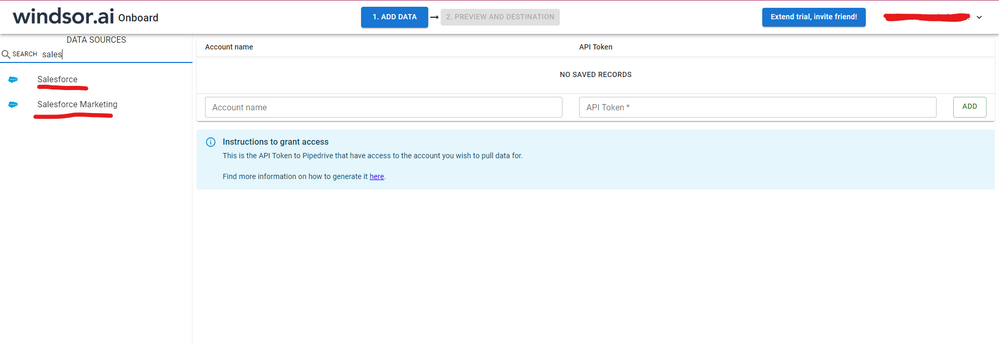
Hi @drtaylor1701 were you able to find a solution? As a workaround, maybe you can try to test your connection with a 3rd party connector. I've tried windsor.ai, supermetrics and funnel.io. I stayed with windsor because it is much cheaper so just to let you know other options. In case you wonder, to make the connection first search for the Salesforce connector in the data sources list:
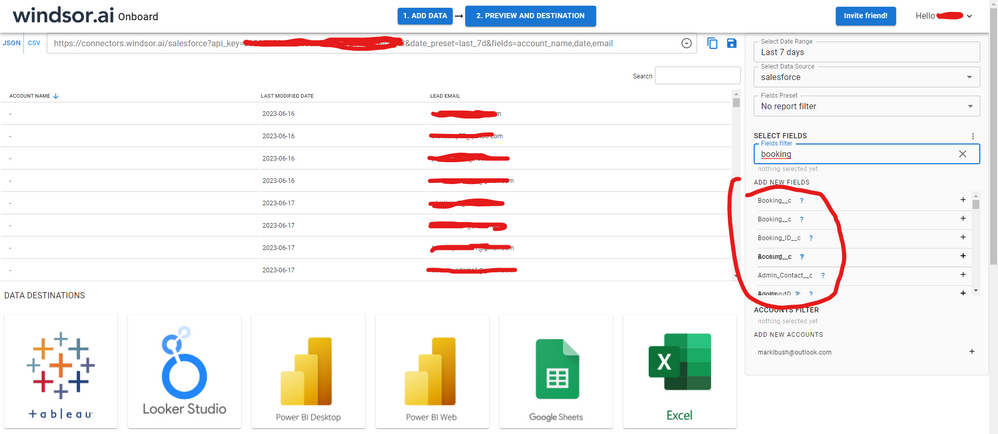
After that, just grant access to your Salesforce account using your credentials, then on preview and destination page you will see a preview of your Salesforce fields:
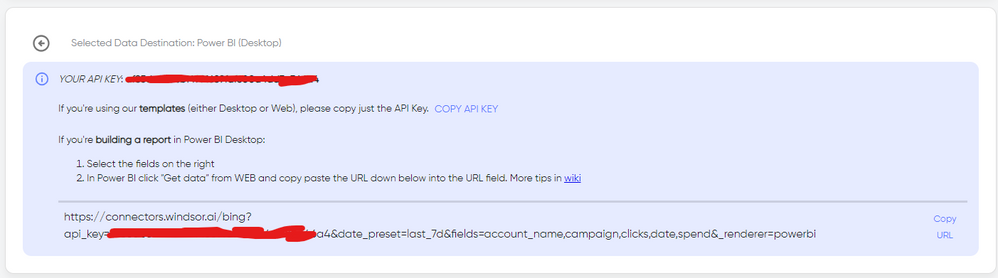
There just select the fields you need. It is also compatible with custom fields and custom objects, so you'll be able to export them through windsor. Finally, just select PBI as your data destination and finally just copy and paste the url on PBI --> Get Data --> Web --> Paste the url.
Hi @drtaylor1701 ,
Could you please check if your license to Salesforce reach the quota limit? Please refer to the similar thread: Solved: Can't connect to Salesforce Objects - Microsoft Power BI Community
How to Get Your Question Answered Quickly
If it does not help, please provide more details.
Best Regards
Community Support Team _ Rongtie
If this post helps, then please consider Accept it as the solution to help the other members find it more quickly.
Update: I revoked all the connections cached in Salesforce and attempted to sign in again. Same results.
Check out the April 2026 Power BI update to learn about new features.
Sign up to receive a private message when registration opens and key events begin.
If you have recently started exploring Fabric, we'd love to hear how it's going. Your feedback can help with product improvements.
| User | Count |
|---|---|
| 30 | |
| 23 | |
| 23 | |
| 16 | |
| 15 |
| User | Count |
|---|---|
| 61 | |
| 35 | |
| 28 | |
| 22 | |
| 21 |